
Quick Summary
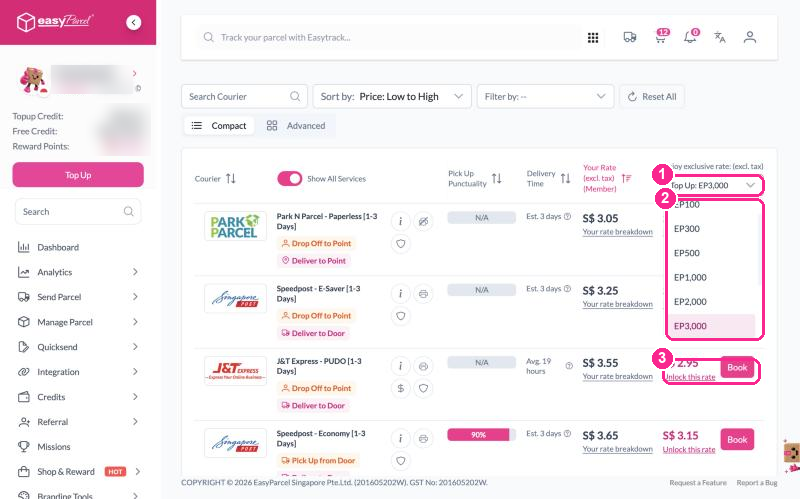
Next to Your Rate, you may see a lower exclusive rate with an Unlock this rate link. Use the Enjoy exclusive rate dropdown to choose a top-up amount (from EP100 up to EP3,000) and see the rates you could get at that level.
We'll Cover:
Your rate vs exclusive rate
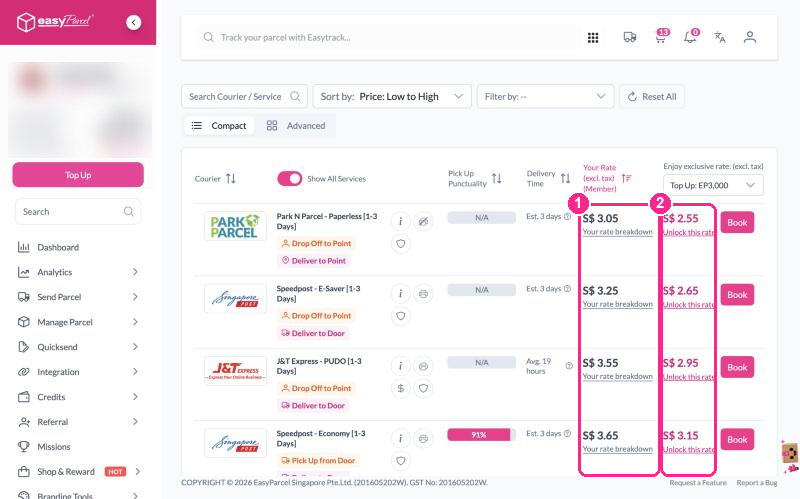
Your Rate is the price you pay with your current account. The pink exclusive rate beside it is a lower price you can unlock by topping up.
On the quote results: Your Rate (1) and the pink exclusive rate (2).
How to preview exclusive rates?
- On the quote results page, find Enjoy exclusive rate (1) at the top of the rate columns.
- Open the dropdown and choose a top-up level (2), such as EP500 or EP3,000.
- The pink prices update. Click Unlock this rate (3) to find out how to get it.
Note: All prices shown are before tax. Choosing a level in the dropdown only previews the rates; it does not top up your account.
What's next?
Still need help?
Our team is happy to help. ? Live Chat | ✉️ Contact Us