
Quick Summary
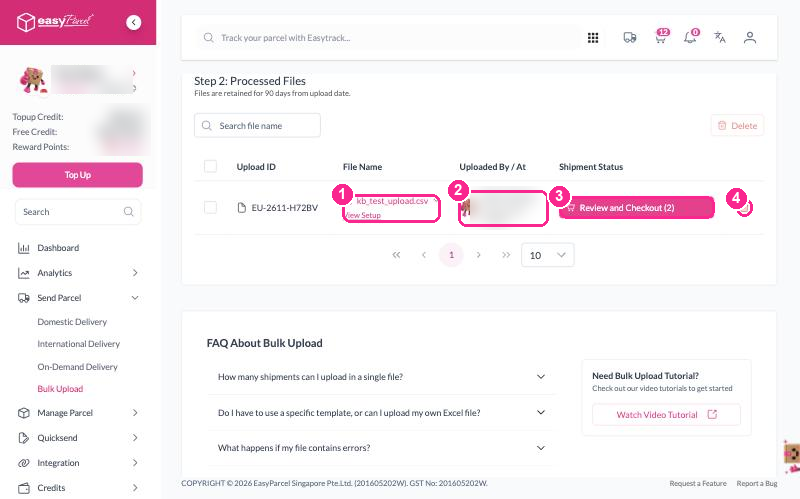
Every file you upload is listed in Step 2: Processed Files on the Bulk Upload page. It stays there for 90 days. Click Review and Checkout to see the parcels and pay for them.
We'll Cover:
The Processed Files list
For each file, you will see the Upload ID, the File Name (1) with View Setup, who uploaded it and when (2), and the Shipment Status (3). Use Search file name to find a file, or the delete icon (4) to remove it.
Review and check out
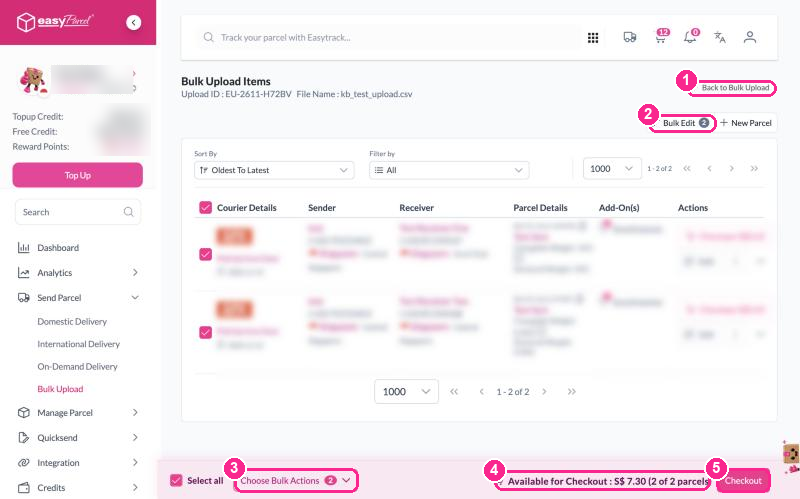
Click Review and Checkout (3). The number shows how many parcels are ready. On the Bulk Upload Items page, check your parcels and click Checkout (5).
Note: Files are kept for 90 days from the upload date.
What's next?
- Pay for your parcels: see How can I pay for my shipment orders?
- Some rows failed?: see My bulk file has errors. How do I fix them?
Want the full flow from start to end? See How do I book many parcels with Bulk Upload?
Still need help?
Our team is happy to help. ? Live Chat | ✉️ Contact Us