
Quick Summary
Open a courier in your zone and choose the shipping rate setting. Customers see this price at checkout.
We'll Cover:
- Steps
- Shipping rate options
- Free shipping rule
Steps
- Go to WooCommerce > Settings > Shipping > EasyParcel Courier Setting.
- Open your zone, then click the courier name or Edit.
- Check the Courier Display Name.
- Choose the Shipping Rate Setting (see the table below).
- If you want free shipping, tick Enable free shipping rule to apply.
- Click Save changes.
Courier Display Name (1), Shipping Rate Setting (2), Add On Options (3), the free shipping rule (4) and Free shipping requires.. (5).
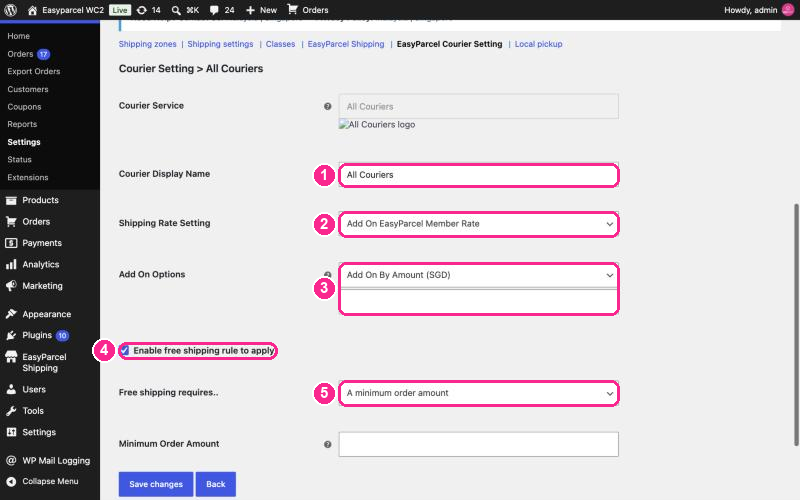
Shipping rate options
| Option | What it does |
|---|---|
| EasyParcel Member Rate | Customers pay your EasyParcel member rate. |
| Add On EasyParcel Member Rate | Customers pay the member rate plus an extra charge. Choose Add On By Amount or Add On By Percentage (%), then enter the value. |
| Flat Rate | Customers pay one fixed price. |
Free shipping rule
Tick Enable free shipping rule to apply. Then choose Free shipping requires..: A minimum order amount or A minimum order quantity, and enter the minimum.
What's next?
Still need help?
Our team is happy to help. ? Live Chat | ✉️ Contact Us