
Quick Summary
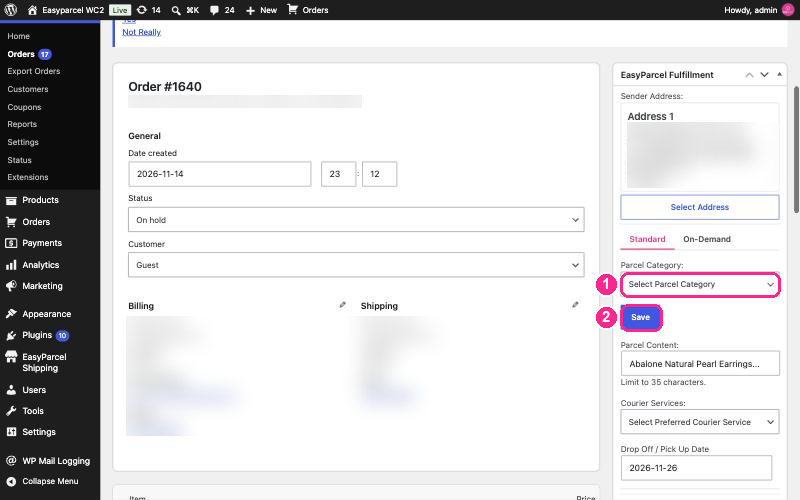
Choose the parcel category in the EasyParcel Fulfillment box on the order, then click Save.
We'll Cover:
- Steps
- Categories you can choose
Steps
- Go to WooCommerce > Orders and open the order.
- In the EasyParcel Fulfillment box, open Parcel Category.
- Choose the category that fits your parcel.
- Click Save.
Choose Parcel Category (1), then click Save (2).
Categories you can choose
- Bags & Luggages
- Board Games
- Computers & Laptops
- Cameras
- Books
- Dry Food
- Fashion
- Fashion Accessories
- Gaming
- Health & Beauty
- Home Appliances
- Home Decor
- Jewelry
- Mobile Phones
- Pet Accessory
- Supplements
- Sport & Leisure
- Tablets
- Toys
- Watches
- Automotive Accessories
- Document
- Computers / Telecommunication Accessory
- Supplements/Food Enhancers/Stabilizers
What's next?
Still need help?
Our team is happy to help. ? Live Chat | ✉️ Contact Us