
Quick Summary
Open WooCommerce > Settings > Shipping > EasyParcel Shipping, check each setting, then click Save changes.
We'll Cover:
- Where to find it
- Plugin options
- Sender country and details
- Sender addresses
- Tracking notifications
- Order status
- Packing list
- Currency conversion
- On-Demand delivery
Where to find it
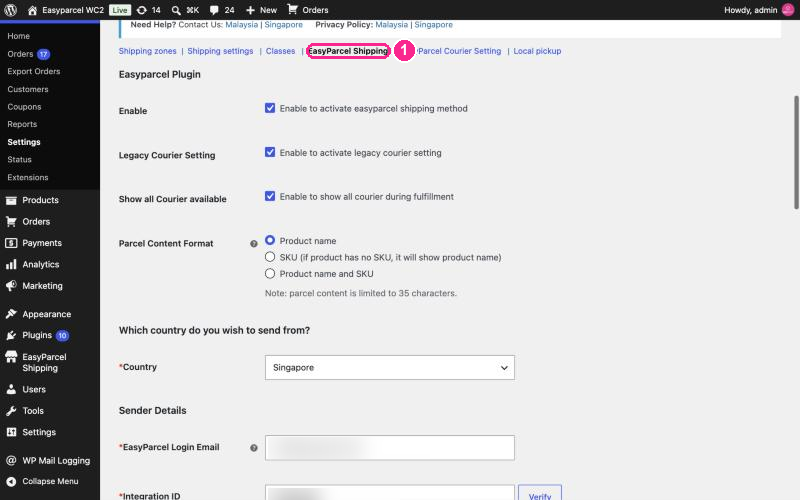
- In WordPress, go to WooCommerce > Settings > Shipping.
- Click EasyParcel Shipping. You can also click EasyParcel Shipping in the left menu.
Click EasyParcel Shipping (1).
Plugin options
| Setting | What it does |
|---|---|
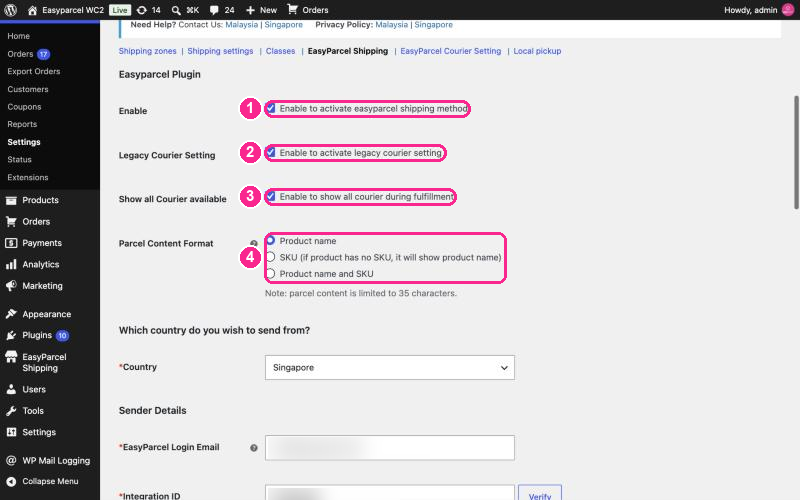
| Enable | Turns the EasyParcel shipping method on. |
| Legacy Courier Setting | Turns on the legacy courier setting. Leave it as it is unless our team tells you to change it. |
| Show all Courier available | Shows every available courier when you fulfil an order. |
| Parcel Content Format | Choose what is written as the parcel content: Product name, SKU (the product name if the product has no SKU), or Product name and SKU. |
Parcel content is limited to 35 characters.
You see Enable (1), Legacy Courier Setting (2), Show all Courier available (3) and Parcel Content Format (4).
Sender country and details
| Field | What to enter |
|---|---|
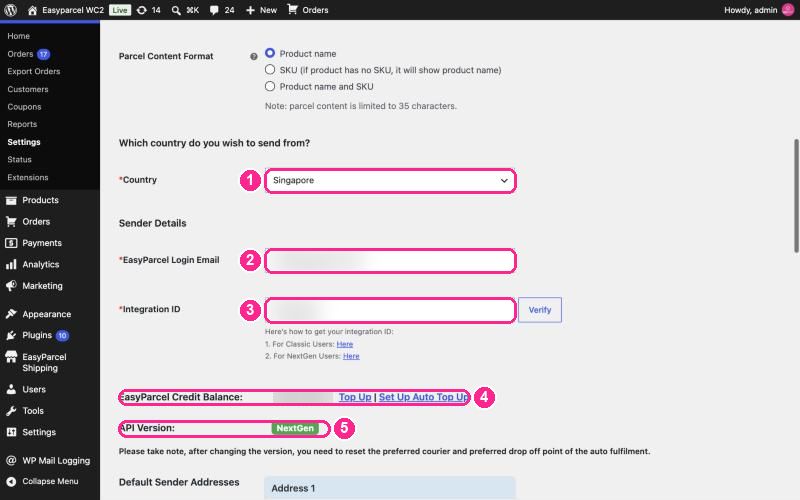
| Country | The country you send from: Malaysia or Singapore. |
| EasyParcel Login Email | The email you use to log in to EasyParcel. |
| Integration ID | Copy it from your EasyParcel account and paste it in. Do not type it by hand. Then click Verify. |
Below these you see your EasyParcel Credit Balance, with Top Up and Set Up Auto Top Up links, and the API Version (NextGen).
After you change the API version, reset the preferred courier and drop-off point in Auto Fulfillment Setting.
You see Country (1), EasyParcel Login Email (2), Integration ID (3), your credit balance (4) and the API Version (5).
More detail: How do I integrate WooCommerce with EasyParcel?
Sender addresses
Under Default Sender Addresses, click Manage Sender Address to add, edit or choose your pickup address.
Tick Enable Save Sender Address (Save Sender Address Meta) to add the sender address label to the order after it is fulfilled.
More detail: How do I add or change my sender address in WooCommerce?.
Tracking notifications
Under Add On Service Settings, tick Enable Tracking Email, Enable Tracking SMS or Enable Tracking Whatsapp.
Order status
Tick Enable order status auto update under Order Status Update Settings to let the plugin update your WooCommerce order status.
Packing list
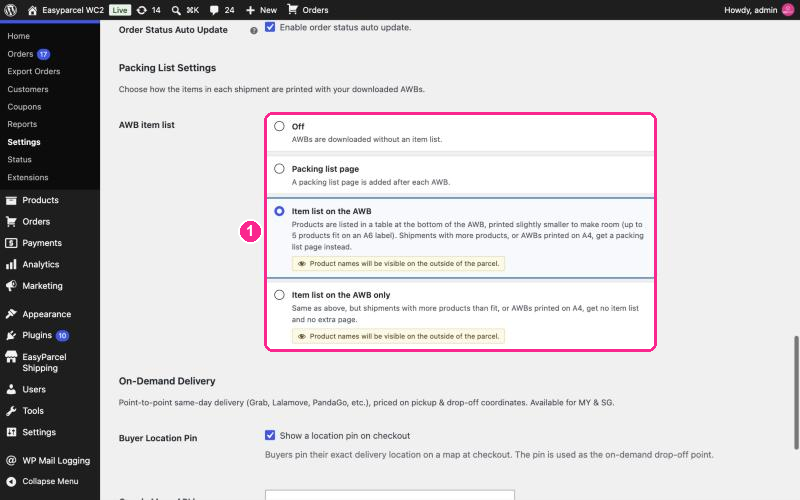
Under Packing List Settings, choose what AWB item list does:
| Option | What you get |
|---|---|
| Off | AWBs are downloaded without an item list. |
| Packing list page | A packing list page is added after each AWB. |
| Item list on the AWB | Products are listed in a table at the bottom of the AWB, printed slightly smaller. Up to 5 products fit on an A6 label. Shipments with more products, or AWBs printed on A4, get a packing list page instead. Product names are visible on the outside of the parcel. |
| Item list on the AWB only | The same, but shipments with more products than fit, or AWBs printed on A4, get no item list and no extra page. Product names are visible on the outside of the parcel. |
The four AWB item list options (1).
Currency conversion
This field only shows when your store currency is different from your EasyParcel currency (the currency of your sender country). If you see it, enter the rate under Currency Conversion Rate. More detail: How do I convert my WooCommerce store currency?
On-Demand delivery
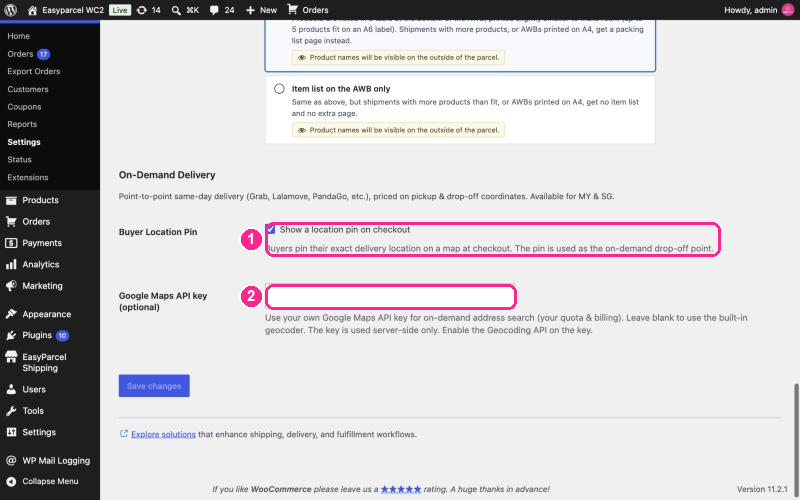
On-Demand is point-to-point same-day delivery (for example Grab, Lalamove and PandaGo). It is available for Malaysia and Singapore.
Under On-Demand Delivery, tick Buyer Location Pin to show a map pin at checkout. Buyers pin their exact delivery location, and the pin is used as the on-demand drop-off point.
Google Maps API key (optional) lets you use your own key for on-demand address search. It uses your own Google quota and billing. Leave it blank to use the built-in map search.
More detail: How do I use On-Demand delivery from WooCommerce?
Buyer Location Pin (1) and Google Maps API key (2).
Save
Click Save changes at the bottom of the page.
What's next?
Still need help?
Our team is happy to help. ? Live Chat | ✉️ Contact Us