
Quick Summary
On-Demand sends an order point-to-point with an instant courier. Open the order, choose the On-Demand tab and place the order.
We'll Cover:
- Before you start
- Pick-up address
- Place an order
- Buyer location pin
- Google Maps API key (optional)
- Book On-Demand from an order
Before you start
- The plugin is connected with your Integration ID.
- You have enough credit. On-Demand is charged when you place the order.
- Your sender address is in Singapore or Malaysia.
- The order is not fulfilled yet.
Pick-up address
In WooCommerce > Settings > Shipping > EasyParcel, set your sender address and pin the exact pick-up spot on the map. Save.
Place an order
- Open the unfulfilled order and click On-Demand.
- Check the Pick Up pin and add a remark if needed.
- Check the Drop Off pin and add a drop-off remark (required).
- Choose the pick-up date and time. It cannot be in the past.
- Enter each parcel: description, quantity, weight (at least 0.1 kg) and size (at least 0.1 cm).
- Click Get quotation, choose a courier and click Place on-demand order.
Buyer location pin
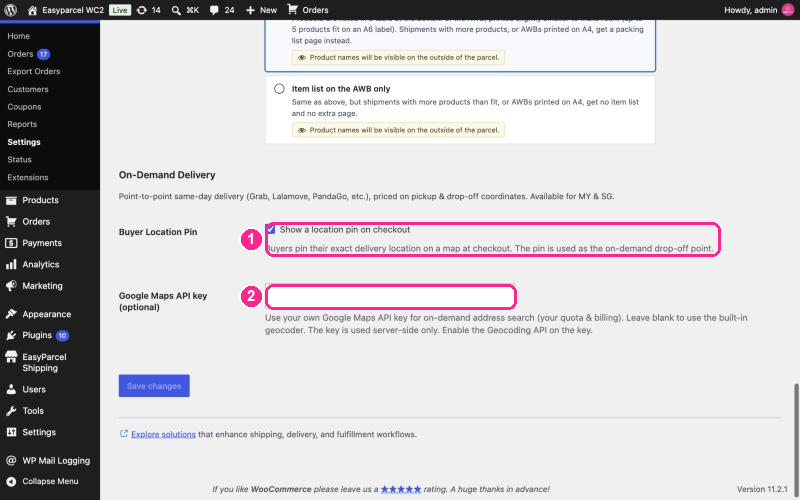
Go to WooCommerce > Settings > Shipping > EasyParcel Shipping. Under On-Demand Delivery, tick Buyer Location Pin.
Buyers pin their exact delivery location on a map at checkout. The pin is used as the on-demand drop-off point.
See what customers see at checkout: What do my customers see at checkout in WooCommerce?
Google Maps API key (optional)
You can use your own Google Maps API key for on-demand address search. It uses your own Google quota and billing. Leave it blank to use the built-in map search.
Buyer Location Pin (1) and Google Maps API key (2).
Book On-Demand from an order
On the order page, choose the On-Demand tab in the EasyParcel Fulfillment box. To book many orders, use the bulk action EasyParcel On-Demand Booking.
More detail: How do I set up the EasyParcel plugin settings in WooCommerce?
What's next?
Still need help?
Our team is happy to help. ? Live Chat | ✉️ Contact Us