
Quick Summary
Fixes for common fulfilment and AWB problems.
We'll Cover:
- Fulfilment page keeps loading
- Not enough credit
- No AWB or tracking number after fulfilling
- Error: Order Failed. Details can only be in English
- No courier to select when fulfilling
- Other questions
- Where is the tracking number?
- How do I print many AWBs?
Fulfilment page keeps loading
- The server may be slow.
- Clear the cache with Ctrl+Shift+R.
- Update to the latest plugin version.
- Check the WooCommerce status log.
Not enough credit
Top up your EasyParcel credit and fulfil the orders again.
No AWB or tracking number after fulfilling
The courier may not have returned the AWB yet, or your credit was too low. Wait, then press the retry button to fetch the AWB.
Error: Order Failed. Details can only be in English
Some couriers only accept English. Check that no detail contains other languages.
No courier to select when fulfilling
Check the EasyParcel Shipping page details. If correct, contact integration support.
Other questions
- Multisite: install both plugins from Network Administrator, then activate them from the sub-site Administrator.
- No Plugin tab: you may not be logged in as administrator.
- There is no sandbox. The plugin is for live use only.
Where is the tracking number?
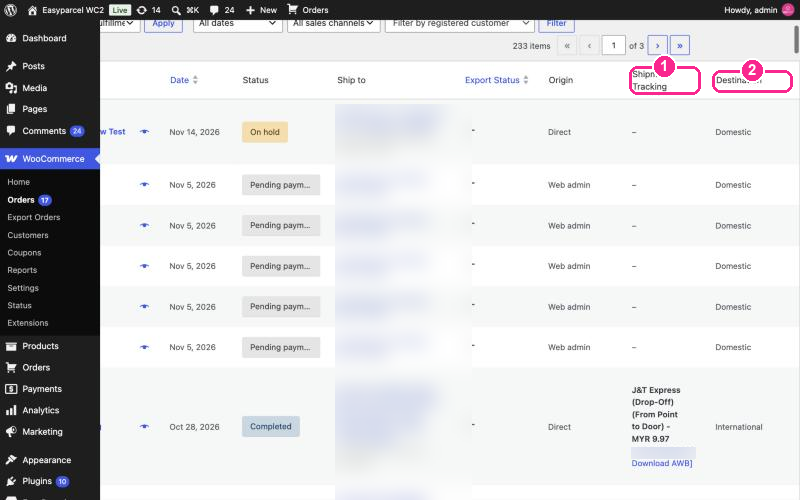
Look in the Shipment Tracking column on WooCommerce > Orders. It shows the courier, the tracking number and a Download AWB link.
How do I print many AWBs?
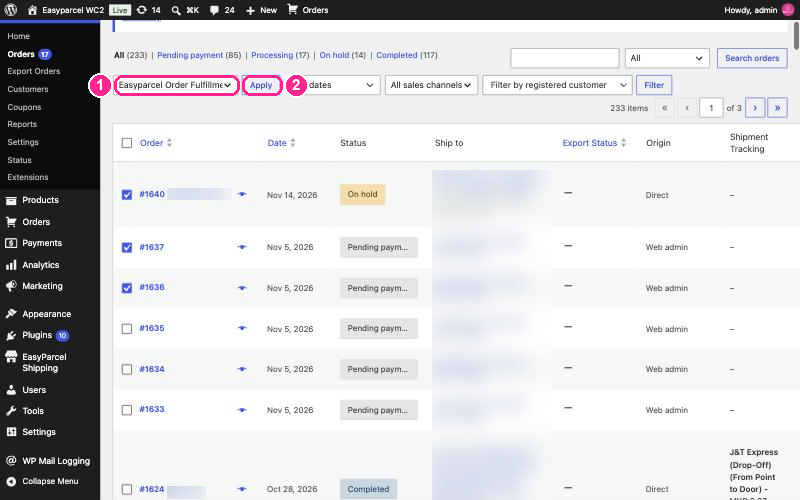
Tick the orders on WooCommerce > Orders. Under Bulk actions, choose EasyParcel Download AWBs and click Apply. See How do I fulfil many WooCommerce orders at once?.
What's next?
Still need help?
Our team is happy to help. ? Live Chat | ✉️ Contact Us