
Quick Summary
At checkout, customers see the couriers and prices you set up, and a map to pin their delivery location for On-Demand.
We'll Cover:
- Courier options
- Pin your delivery location
- Good to know
Courier options
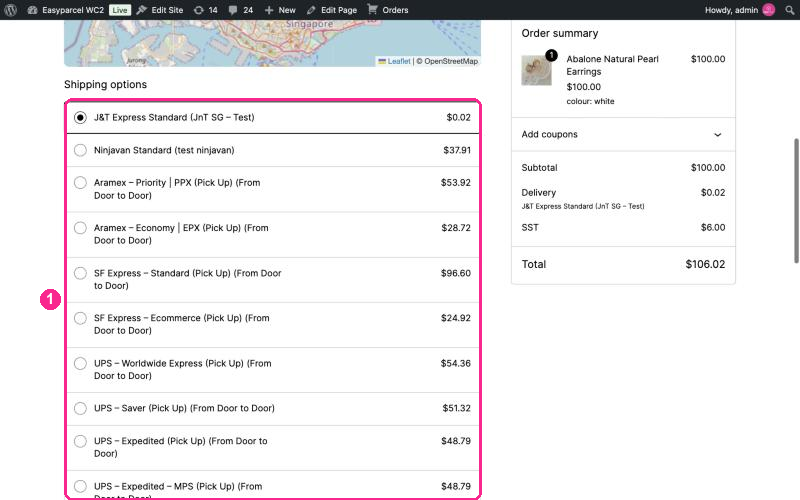
Under Shipping options, customers see the couriers that are turned on for their zone. The price shows next to each courier. The courier they choose shows under Delivery in the order summary.
Customers choose from the Shipping options list (1).
Pin your delivery location
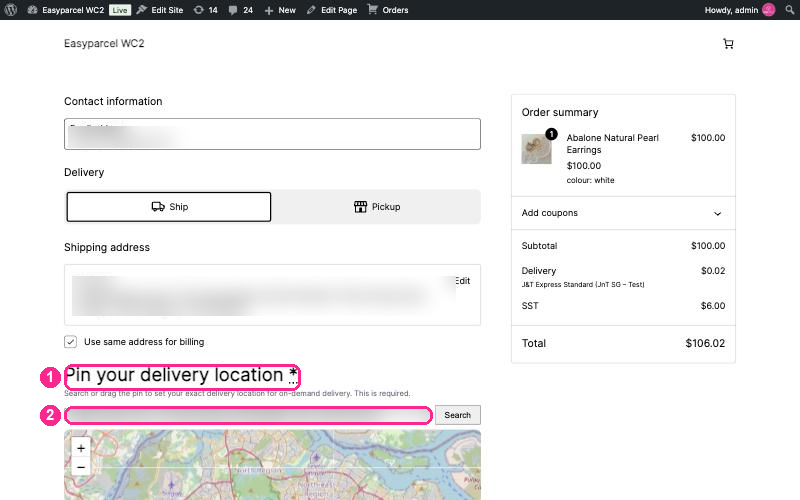
If Buyer Location Pin is ticked in your plugin settings, customers also see Pin your delivery location. They search for an address or drag the pin to set their exact delivery location. This is required for On-Demand delivery.
The Pin your delivery location heading (1) and the address search box (2).
Good to know
- The couriers come from your zone and your courier setting: How do I set the couriers shown at WooCommerce checkout?.
- The price comes from the rate you choose: How do I choose the shipping rate customers pay at WooCommerce checkout?.
- To turn the location pin on or off, see How do I set up the EasyParcel plugin settings in WooCommerce?.
What's next?
Still need help?
Our team is happy to help. ? Live Chat | ✉️ Contact Us