
Quick Summary
Tick your orders on the Orders list, then choose a bulk action: fulfil, download AWBs or book On-Demand.
We'll Cover:
- Fulfil many orders
- Download AWBs for many orders
- Book On-Demand orders in bulk
- What you see on the Orders list
Fulfil many orders
- Go to WooCommerce > Orders.
- Tick the orders you want to ship.
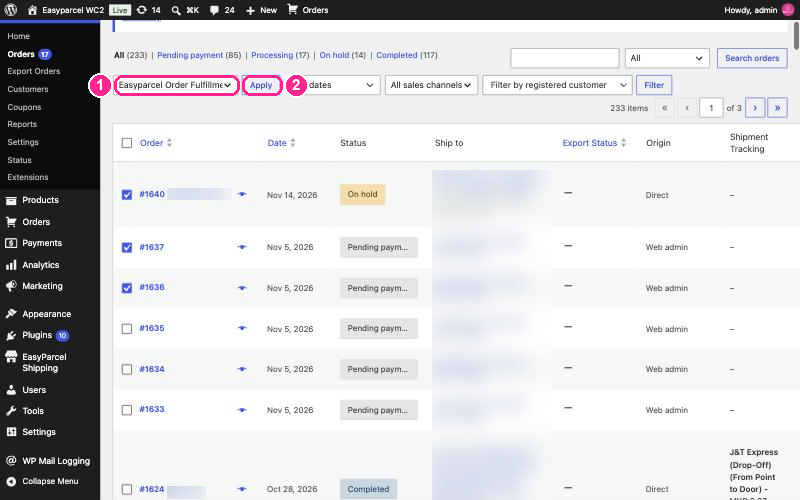
- Under Bulk actions, choose Easyparcel Order Fulfillment and click Apply.
- Check the details shown on the screen, then confirm.
Choose Easyparcel Order Fulfillment from Bulk actions (1), then click Apply (2).
Download AWBs for many orders
- Tick the orders.
- Under Bulk actions, choose EasyParcel Download AWBs and click Apply.
Book On-Demand orders in bulk
Tick the orders and choose EasyParcel On-Demand Booking.
What you see on the Orders list
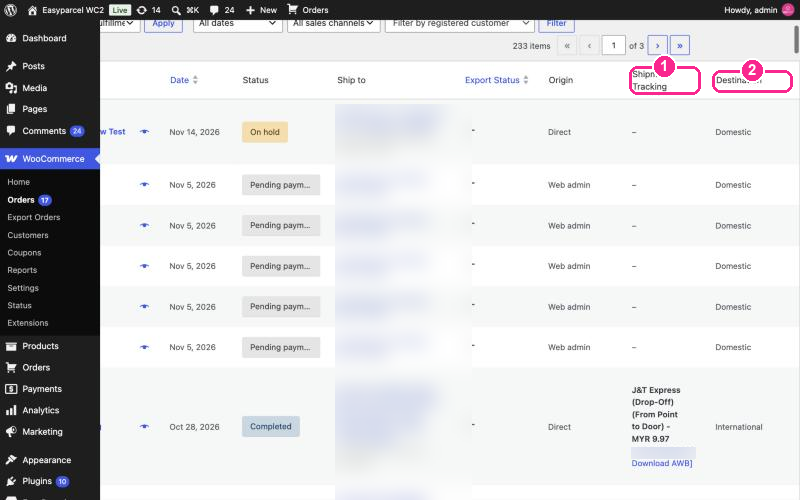
The Orders list shows Shipment Tracking (the courier, the tracking number and a Download AWB link) and Destination (Domestic or International).
Shipment Tracking (1) and Destination (2).
What's next?
Still need help?
Our team is happy to help. ? Live Chat | ✉️ Contact Us