
Quick Summary
Fixes for common checkout and courier problems.
We'll Cover:
- Courier not showing at checkout
- Courier list looks out of order
- Cannot disable or delete a courier
- Cannot edit courier services
- Undefined array error at checkout
- Set a price by weight band
- Courier prices changed after I changed my sender address
Courier not showing at checkout
- Check the Shipping Zone and the EasyParcel Courier Setting are both added.
- Update the plugin to the latest version.
- If you used specific couriers on an old version, delete and add the zone and courier settings again.
- Contact integration support if it still does not show.
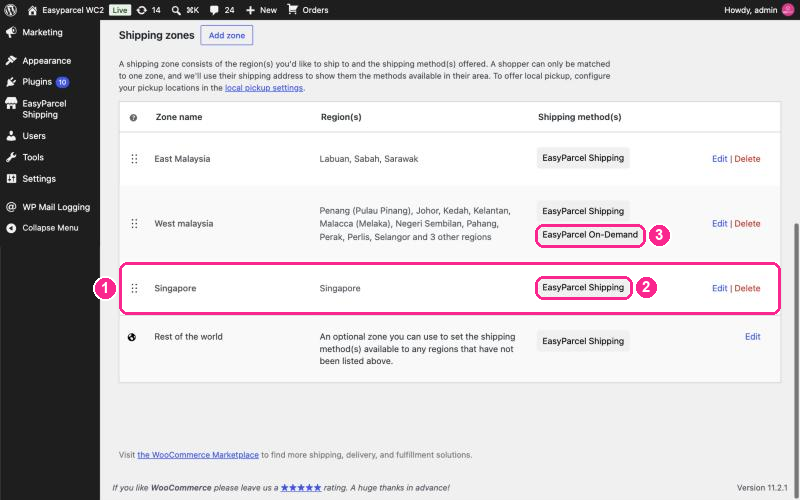
Check that the zone has EasyParcel Shipping as a shipping method, and that it is switched on.
Each zone lists its shipping methods. This Singapore zone (1) uses EasyParcel Shipping (2).
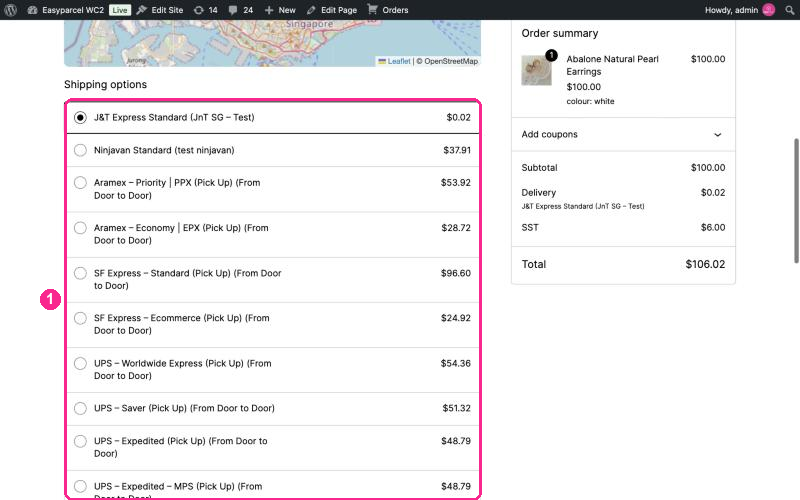
When it works, customers see a list like this. More detail: What do my customers see at checkout in WooCommerce?
The Shipping options list at checkout (1).
Courier list looks out of order
Edit the theme CSS, or try the default WooCommerce theme.
Cannot disable or delete a courier
- Delete a location in the destination.
- Disable the courier and save. If it turns on again, disable it and save again.
- Add the deleted location back and check the checkout page.
Cannot edit courier services
They cannot be edited after saving. Delete and add a new one.
Undefined array error at checkout
Turn off WordPress debug mode by setting WP_DEBUG to false in wp-config.php.
Set a price by weight band
The plugin does not have this feature.
Courier prices changed after I changed my sender address
Courier service settings need to be set up again when you change the default sender address. Go to EasyParcel Shipping > EasyParcel Courier Setting and check each zone. See How do I add or change my sender address in WooCommerce?.
What's next?
Still need help?
Our team is happy to help. ? Live Chat | ✉️ Contact Us