
Quick Summary
Set Auto Fulfill to Yes in Auto Fulfillment Setting and choose your courier and pickup or drop-off.
We'll Cover:
- Steps
- Good to know
Steps
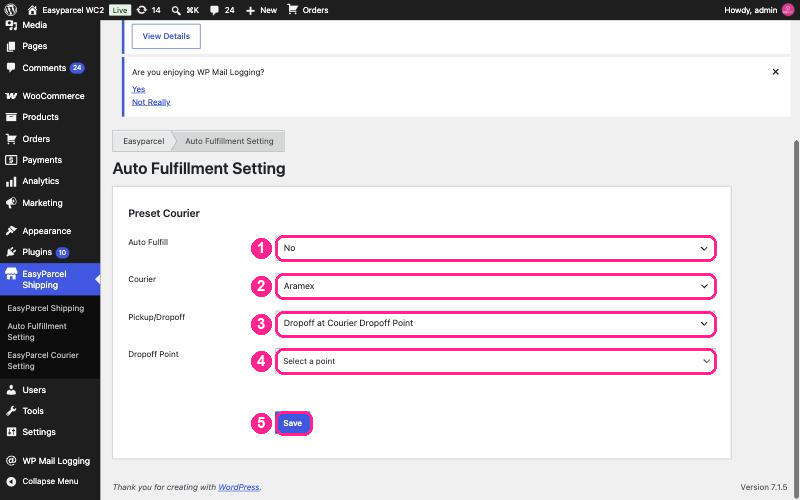
- In the WordPress left menu, click EasyParcel Shipping, then Auto Fulfillment Setting.
- Under Preset Courier, set Auto Fulfill to Yes.
- Choose the Courier.
- Choose Pickup/Dropoff: Courier Pickup from Door or Dropoff at Courier Dropoff Point.
- If you chose drop-off, choose the Dropoff Point.
- Click Save.
Auto Fulfill (1), Courier (2), Pickup/Dropoff (3), Dropoff Point (4) and Save (5).
Good to know
- After you change the API version, set the preferred courier and drop-off point here again.
- If you change your default sender address, check this page too. See How do I add or change my sender address in WooCommerce?.
- Keep enough EasyParcel credit, or turn on Auto Top Up. See How do I set up the EasyParcel plugin settings in WooCommerce?.
What's next?
Still need help?
Our team is happy to help. ? Live Chat | ✉️ Contact Us