
Quick Summary
Open the order, check the details in the EasyParcel Fulfillment box, then click Fulfill Order.
We'll Cover:
- Steps
- Good to know
- After you fulfil
Steps
- Go to WooCommerce > Orders and open the order.
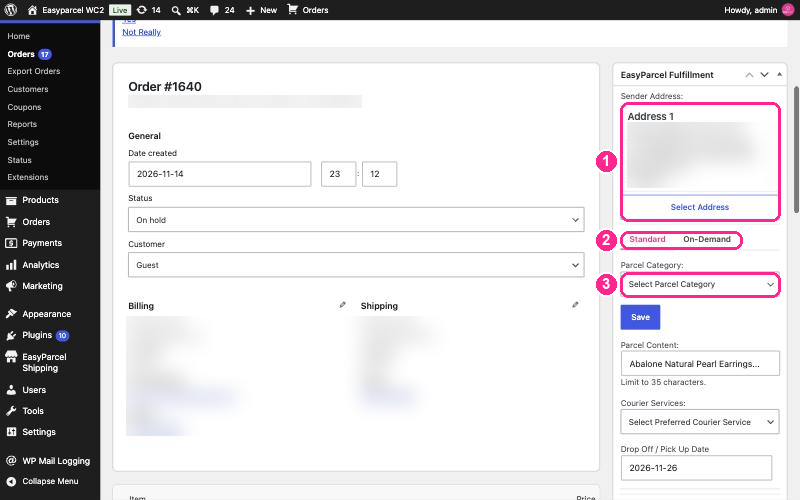
- In the EasyParcel Fulfillment box, check the Sender Address. Click Select Address to change it.
- Choose Standard for a normal courier, or On-Demand for same-day riders.
- For an international parcel, choose the HS Code.
- Choose the Parcel Category and click Save.
- Check the Parcel Content. It is limited to 35 characters.
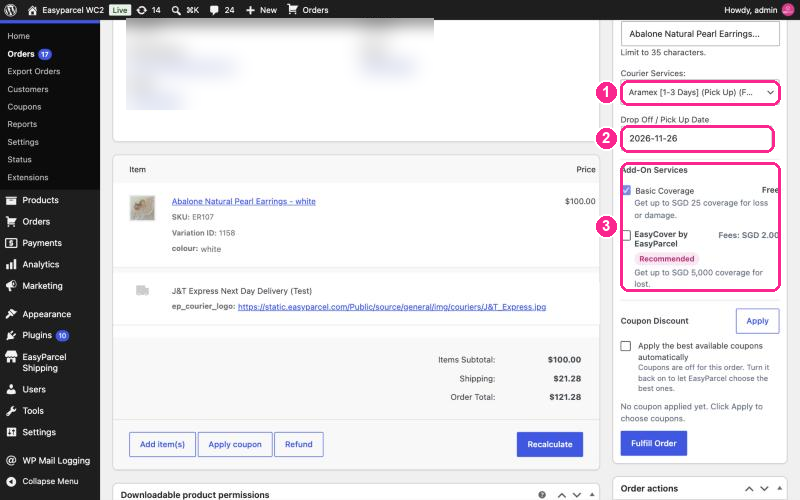
- Under Courier Services, choose a courier. The price shows next to each one. The box then shows the price details.
- Choose the Drop Off / Pick Up Date.
- Choose add-ons if you need them. Basic Coverage is free. Other options, such as EasyCover by EasyParcel, have a fee. International parcels can also have Delivered Duty Paid (DDP), and you can set Cash on Delivery (COD) with the amount to collect.
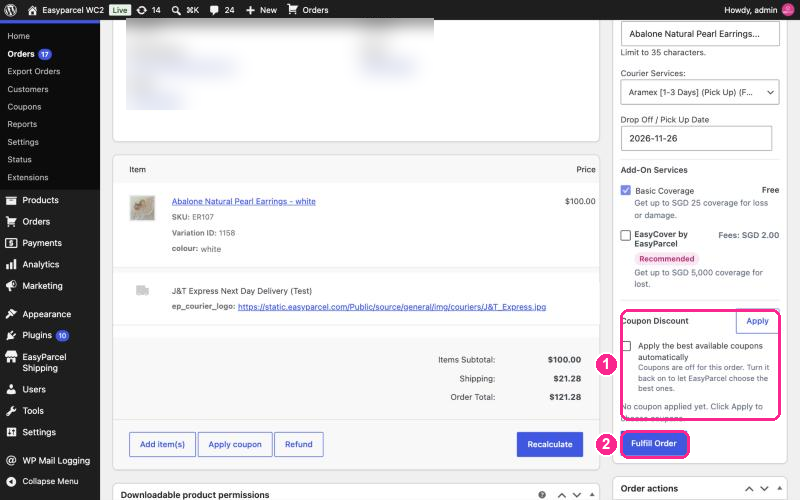
- Apply a coupon, or keep Apply the best available coupons automatically ticked.
- Click Fulfill Order.
Sender Address (1), Standard / On-Demand (2) and Parcel Category (3).
Courier Services (1), Drop Off / Pick Up Date (2) and Add-On Services (3).
Coupon Discount (1) and Fulfill Order (2).
Good to know
- Check the address before you confirm.
- Your EasyParcel credit must cover the price. See the plugin settings for Top Up and Auto Top Up: How do I set up the EasyParcel plugin settings in WooCommerce?.
- For On-Demand, see How do I use On-Demand delivery from WooCommerce?.
After you fulfil
The order box shows Edit FulFillment. The Shipment Tracking column on the Orders list shows the courier, the tracking number and a Download AWB link. To print many AWBs, use EasyParcel Download AWBs (see How do I fulfil many WooCommerce orders at once?).
What's next?
Still need help?
Our team is happy to help. ? Live Chat | ✉️ Contact Us