
Quick Summary
All Parcels lists every parcel you have booked. Open it from Manage Parcel > All Parcels. Search, filter by courier or status, open a parcel's details, download labels and lists, and use the more menu to rebook, report, claim or cancel.
We'll Cover:
Find a parcel
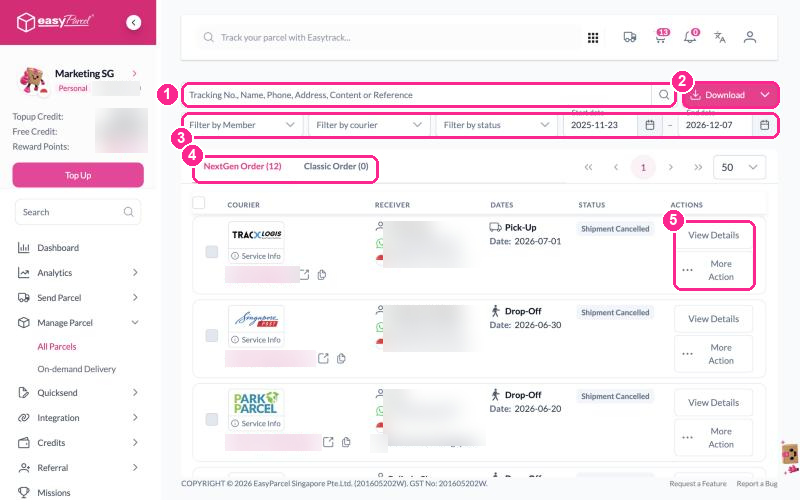
Use Search (1) with a tracking number, name, phone, address, content or reference. Use Download (2) for labels and lists. Narrow the list with Filter by Member, courier and status (3) and the start and end dates. The tabs (4) separate NextGen and Classic orders.
What each row shows?
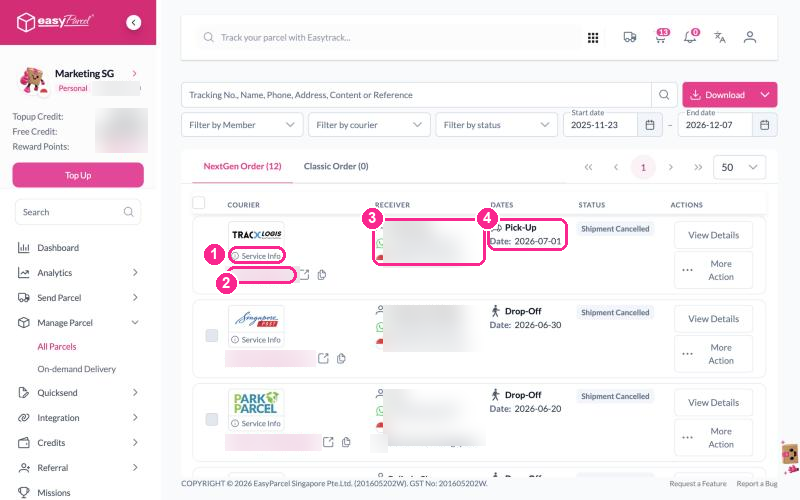
Each parcel shows the courier and its Service Info (1), the tracking number (2), the receiver (3), the pick-up or drop-off date (4) and the status. Use View Details or More Action (5) for actions: Rebook, Book Return Shipment, Report, Request Claim and Cancel. The menu depends on the parcel's status.
Parcel details
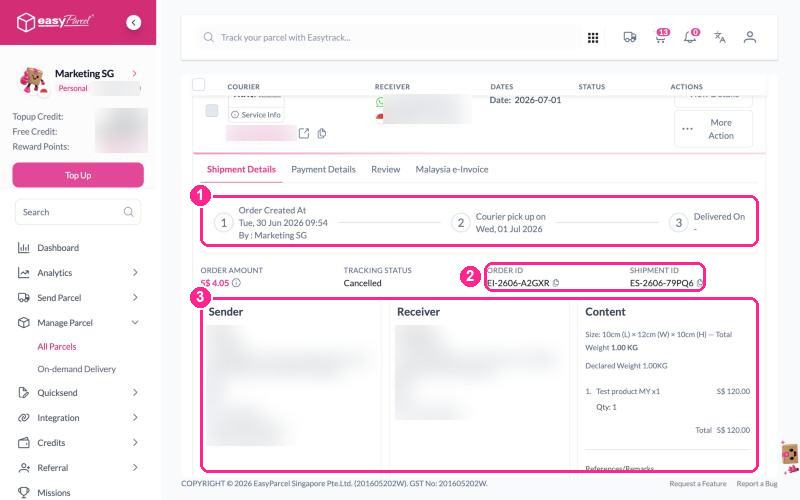
Click View Details to open the parcel inline. It has the tabs Shipment Details, Payment Details and Review. Shipment Details shows the timeline (1), the order and shipment IDs (2), the sender, receiver and the content (3).
Still need help?
Our team is happy to help. ? Live Chat | ✉️ Contact Us