
Quick Summary
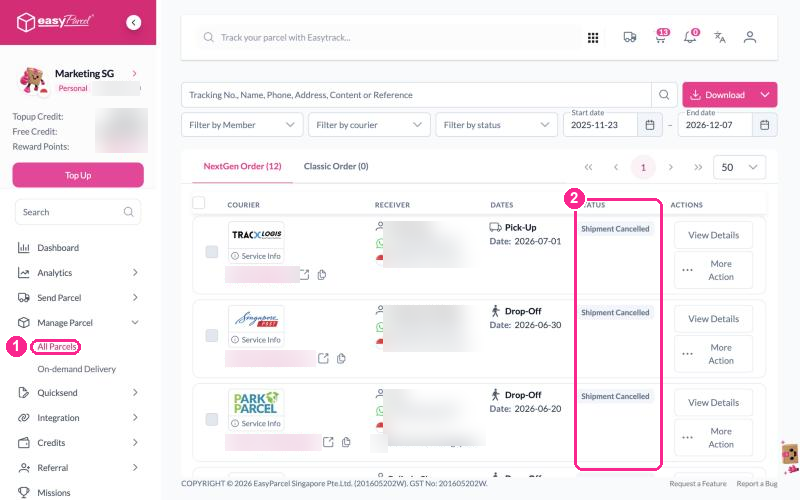
Track your parcel with EasyTrack. Enter your tracking number or order number, or several numbers separated by a space, semicolon or comma. You can also check the status of each parcel in Manage Parcel > All Parcels.
We'll Cover:
Use EasyTrack
- Open EasyTrack from Tools > Tracking (EasyTrack), or use the Track your parcel bar at the top of any page.
- Enter the tracking number or order number (1), for example EI-2512-XXXXX.
- Click Track (2).
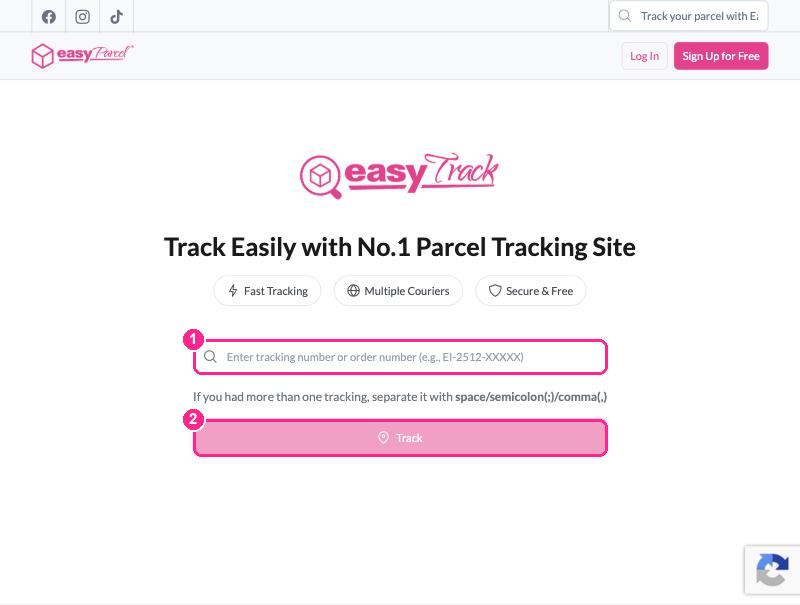
EasyTrack supports many couriers. If you do not know which courier a number belongs to, browse the supported courier list on the page.
Track from All Parcels
The Dates & Status column in All Parcels shows each parcel's status. See What do the parcel statuses mean?
In Manage Parcel > All Parcels (1), the Status (2) column shows where each parcel is.
What's next?
Still need help?
Our team is happy to help. ? Live Chat | ✉️ Contact Us