
Quick Summary
Your receiver can get the tracking number by SMS, email or WhatsApp. Turn on Tracking SMS, Tracking Email or Tracking WhatsApp for the parcel on the booking page, or set them as defaults.
We'll Cover:
Switch it on
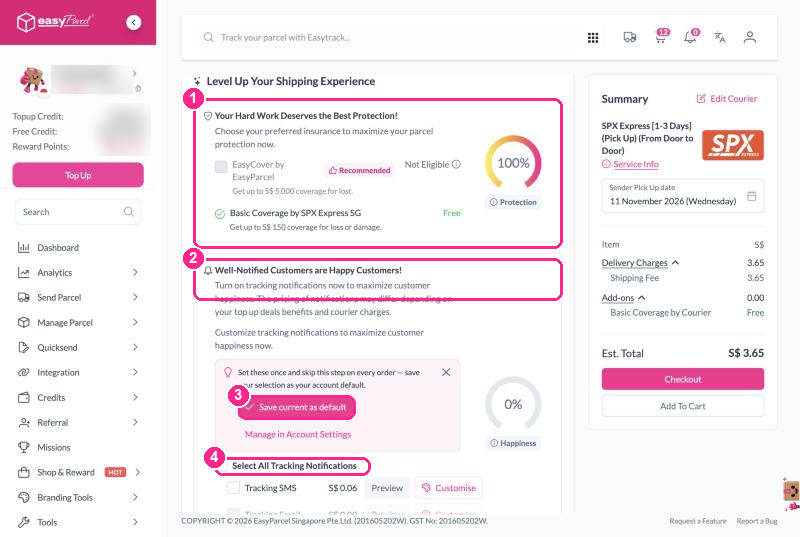
On the booking page, tick the notifications you want under Well-Notified Customers are Happy Customers!. Set them as defaults in Settings > Account Settings. See How do I customise Tracking SMS for my receivers?
The default SMS includes the tracking number and a link to track at EasyParcel. See How do I track my parcel?
On the booking page, the notifications are under Well-Notified Customers are Happy Customers! (2). Click Save current as default (3) to use them on every order.
In the app
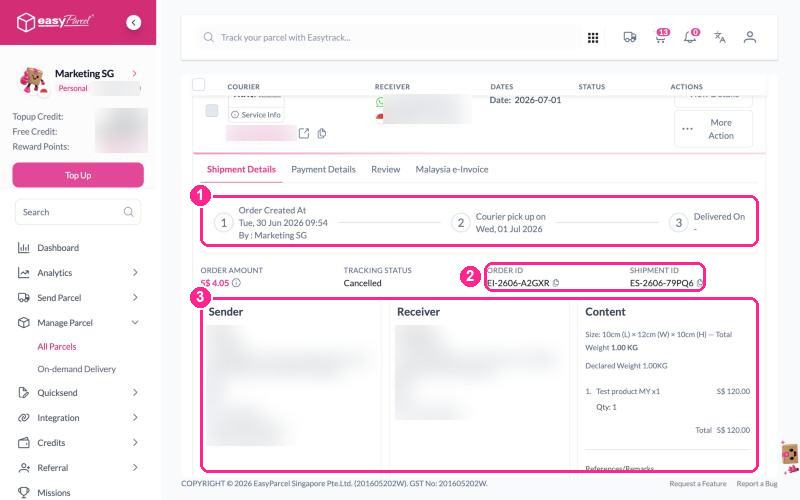
Open the parcel with View Details in All Parcels. The order and shipment IDs are shown at (2). Your receiver can track the parcel at EasyTrack.
What's next?
Still need help?
Our team is happy to help. ? Live Chat | ✉️ Contact Us