
Quick Summary
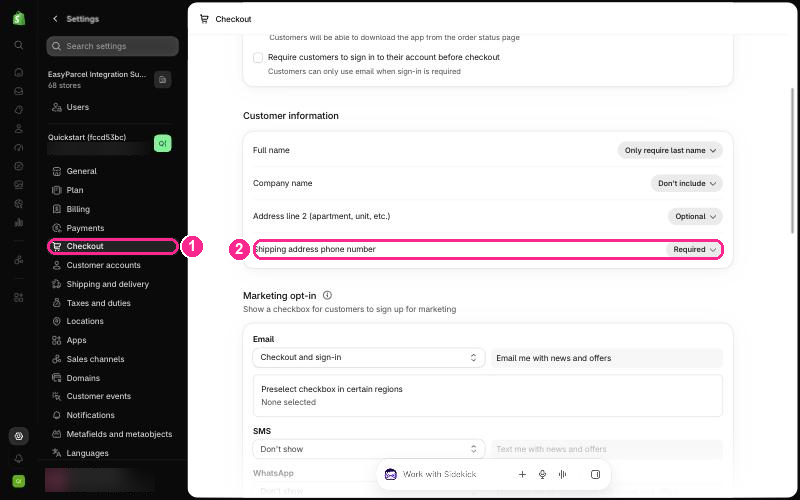
Couriers need your customer's phone number. In Shopify, set Shipping address phone number to Required.
We'll Cover:
Steps
- In Shopify admin, click Settings.
- Click Checkout.
- Under Shipping address phone number, choose Required.
In Shopify Settings > Checkout (1), set Shipping address phone number (2) to Required.
If orders still have no phone
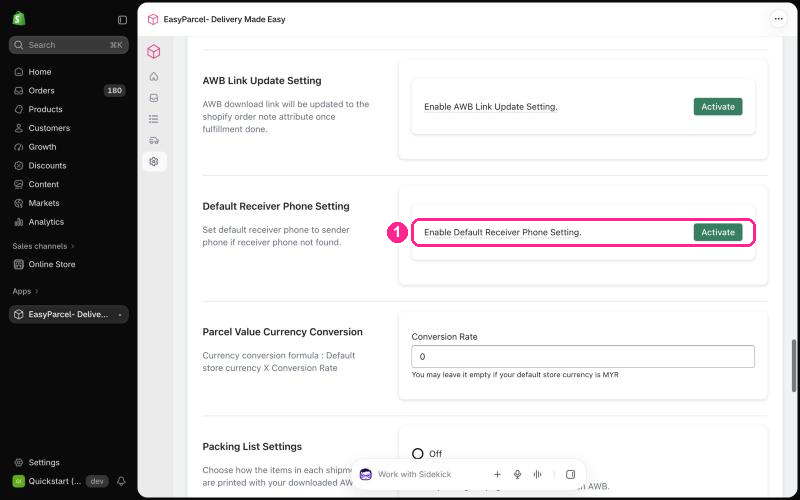
In the app, open Setting > Default Receiver Phone Setting and click Activate. Your sender phone is then used when the receiver has none.
Click Activate next to Enable Default Receiver Phone Setting (1).
What's next?
Still need help?
Our team is happy to help. ? Live Chat | ✉️ Contact Us
