
Quick Summary
In Setting, scroll to Add On Service Settings and click Activate for tracking email, SMS or WhatsApp.
We'll Cover:
Options
| Option | What your customer gets |
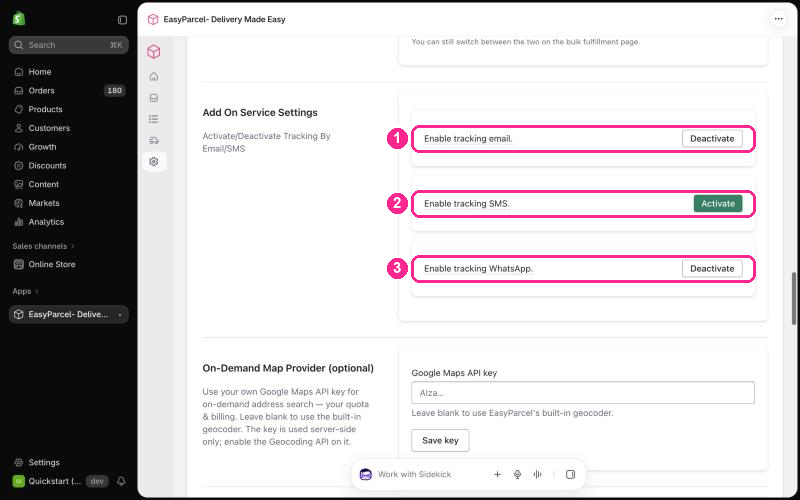
| Enable tracking email | Tracking updates by email |
| Enable tracking SMS | Tracking updates by SMS |
| Enable tracking WhatsApp | Tracking updates on WhatsApp |
In Setting > Shipping Setting, under Add On Service Settings: Enable tracking email (1), Enable tracking SMS (2) and Enable tracking WhatsApp (3).
Good to know
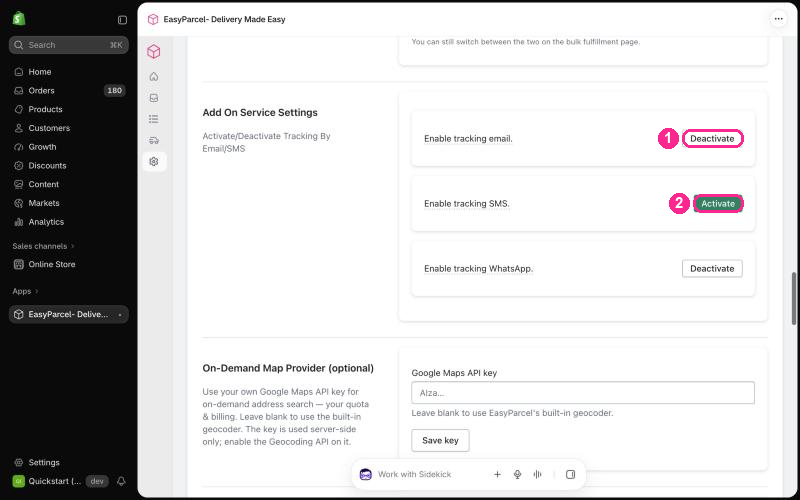
These are paid add-ons and carry an additional charge once activated. A green Activate button means the feature is off. A white Deactivate button means it is on.
Deactivate (1) means the feature is on. Activate (2) means it is off.
What's next?
Still need help?
Our team is happy to help. ? Live Chat | ✉️ Contact Us
