
Quick Summary
Install the EasyParcel app in Shopify, then copy your API key from EasyParcel, paste it into Integration ID in the app under Setting > Shipping Setting, and click Verify.
We'll Cover:
- How do I install the EasyParcel app in Shopify?
- How do I open the EasyParcel app in Shopify?
- Get your API key
- Paste and verify
- If it does not work
How do I install the EasyParcel app in Shopify?
Install the app
- In Shopify admin, click Apps and search for EasyParcel - Delivery Made Easy.
- Click Install.
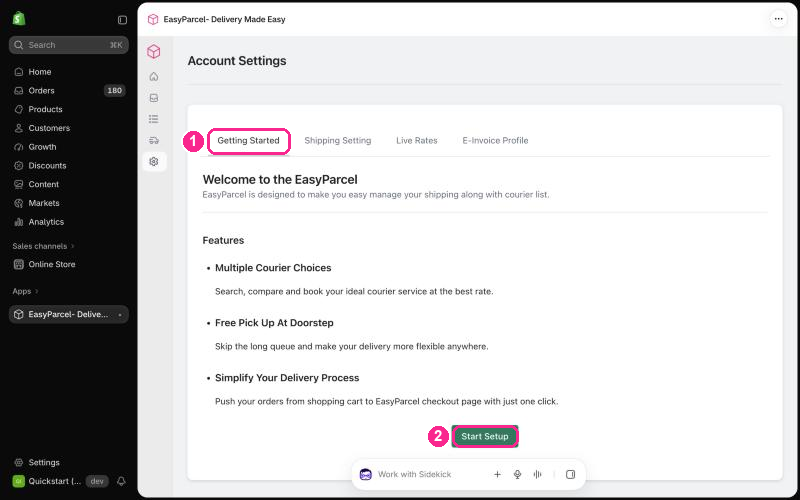
- You land on the Getting Started tab. Read the instructions and click Start Setup.
Fill in Shipping Setting
On the Shipping Setting tab, choose the country you ship from and paste your Integration ID. Check the auto-filled Sender Details and click Save. See How do I integrate my Shopify store to EasyParcel?
After you install, the app opens on the Getting Started (1) tab. Click Start Setup (2).
How do I open the EasyParcel app in Shopify?
Open the app
- Log in to your Shopify admin.
- In the left sidebar, scroll to Apps.
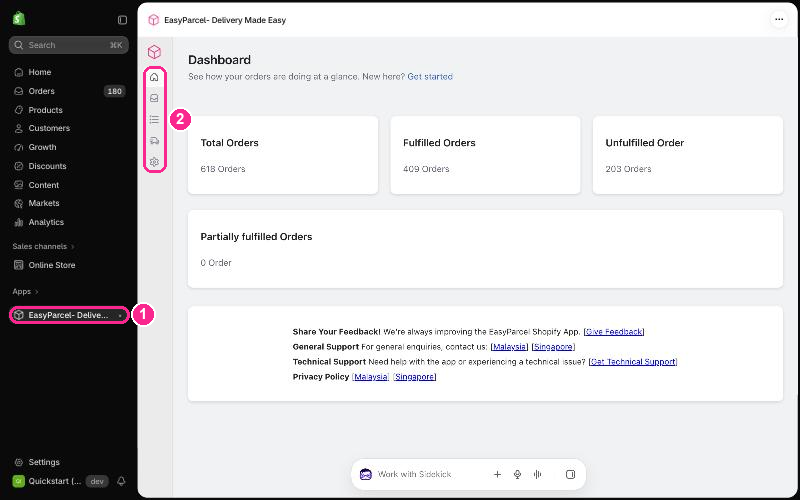
- Click EasyParcel - Delivery Made Easy.
Tip: Go to Shopify > Settings > Checkout and set Shipping address phone number to Required. Couriers need your customer's phone number to deliver.
The app menu
| Menu | Use it to |
| Dashboard | See how your orders are doing |
| Orders | Sync, quote and fulfil orders |
| Fulfillment Batches | Review groups of orders you shipped together |
| Auto Fulfillment | Let orders ship automatically |
| Setting | Set up your store, sender details and preferences |
Common problems
| Problem | Try this |
| New order is not showing | Click Sync orders from Shopify and check the order is marked Paid |
| Courier cannot reach the customer | Make the phone number Required at Shopify checkout |
| Auto fulfilment did not ship an order | Check your EasyParcel credit and the Auto Fulfillment log |
| Pick-up went to an old address | Update your sender details in Setting |
Click EasyParcel - Delivery Made Easy (1) under Apps. The app menu (2) shows, from top to bottom: Dashboard, Orders, Fulfillment Batches, Auto Fulfillment and Setting.
Get your API key
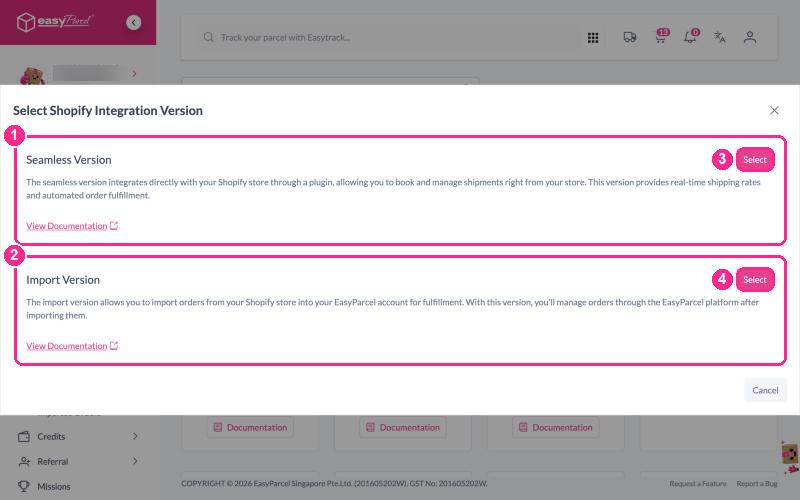
Follow How do I add an ecommerce app to my EasyParcel account?, choose Shopify and the Seamless Version, then click Copy next to your API Key.
When you click Install App, choose the version: Seamless Version (1) or Import Version (2). Click Select on the one you want (3).
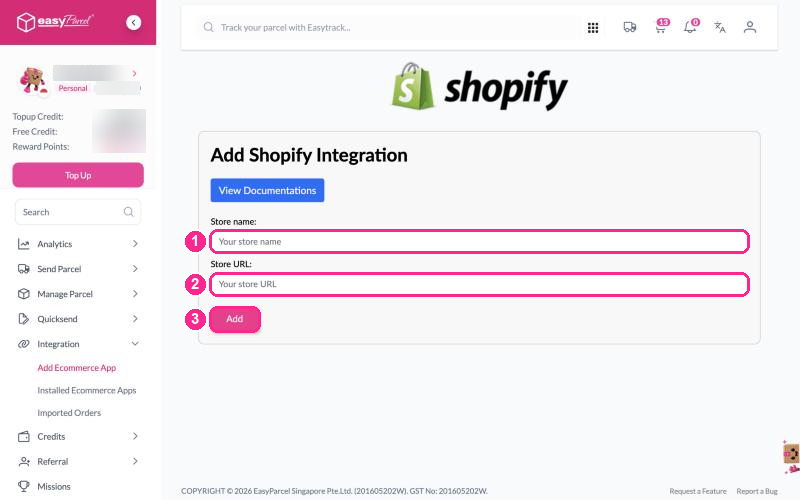
Then enter your Store name (1) and Store URL (2), and click Add (3).
Paste and verify
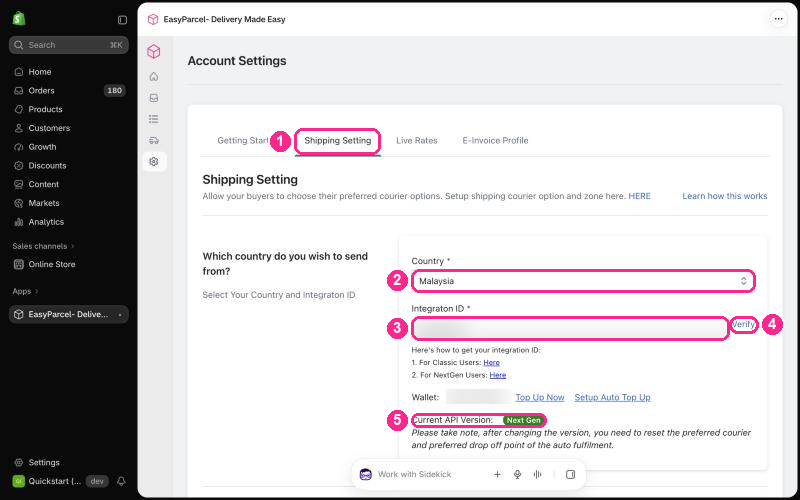
- Open the EasyParcel app in Shopify and click Setting.
- Under the Shipping Setting tab, check the Country.
- Paste the key into Integration ID.
- Click Verify.
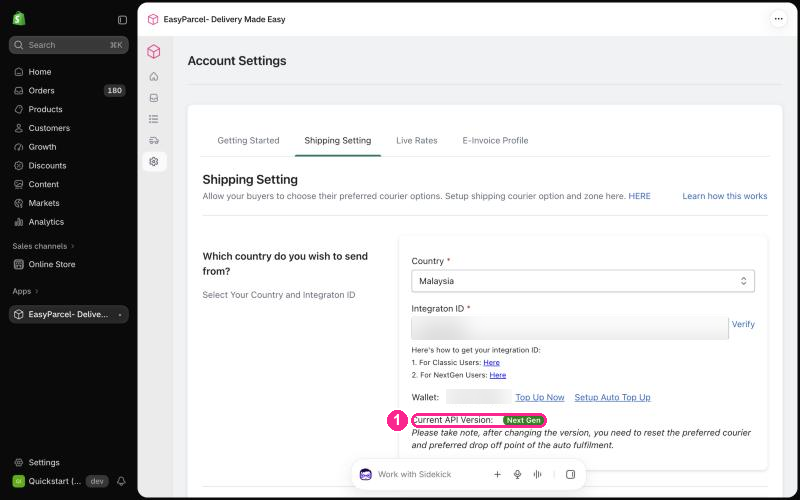
When it works, you see your Wallet balance and Current API Version: Next Gen. If you see Classic, contact support.
Open the Shipping Setting (1) tab, check the Country (2), paste the key into Integration ID (3) and click Verify (4). When it works, Current API Version (5) shows Next Gen.
If it does not work
| Message | What to do |
| Error from Easy Parcel: Unauthorized user | The key was not pasted exactly. Copy it again with the Copy button and paste it, do not type it |
| Error from Easy Parcel: Unverified account | Verify your EasyParcel account first, then try again |
| Current API Version shows Classic | Check you copied the key from the Seamless Version setup, then contact support |
Check that Current API Version (1) shows Next Gen.
What's next?
Still need help?
Our team is happy to help. ? Live Chat | ✉️ Contact Us
