
Quick Summary
Live rates let customers see EasyParcel courier rates at Shopify checkout. Turn on Show at checkout in the app (Setting > Live Rates), check your Markets, then add Easyparcel (via app) as a shipping option in each zone.
We'll Cover:
- Check your Shopify plan
- Activate in EasyParcel
- Check Markets
- Add the shipping option
- Which Shopify plan do I need for live rates?
- How do I activate live rates and check my Markets?
- How do I add EasyParcel as a shipping option in Shopify?
Check your Shopify plan
Shopify needs Carrier-Calculated Shipping to show live rates.
| Shopify plan | Live rates |
| Basic | Not included |
| Grow, annual billing | Included |
| Grow, monthly billing | Needs the feature added for an extra fee, or annual billing |
| Advanced and Plus | Included |
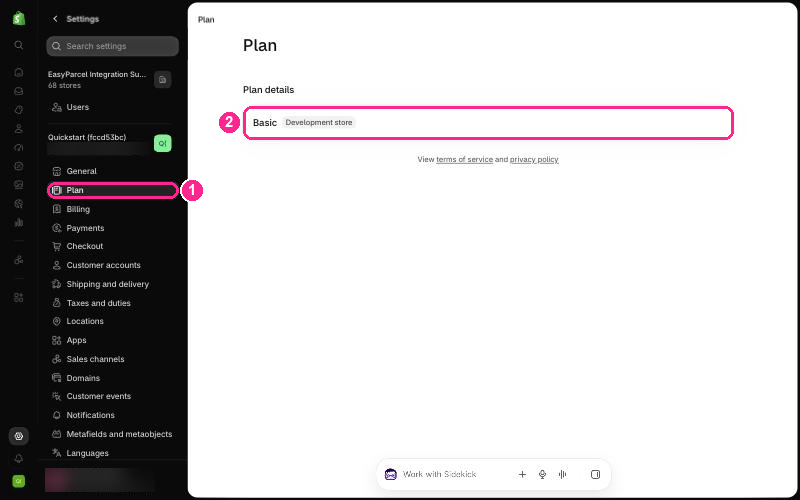
To see your plan, go to Shopify Settings > Plan (1) and check Plan details (2).
Activate in EasyParcel
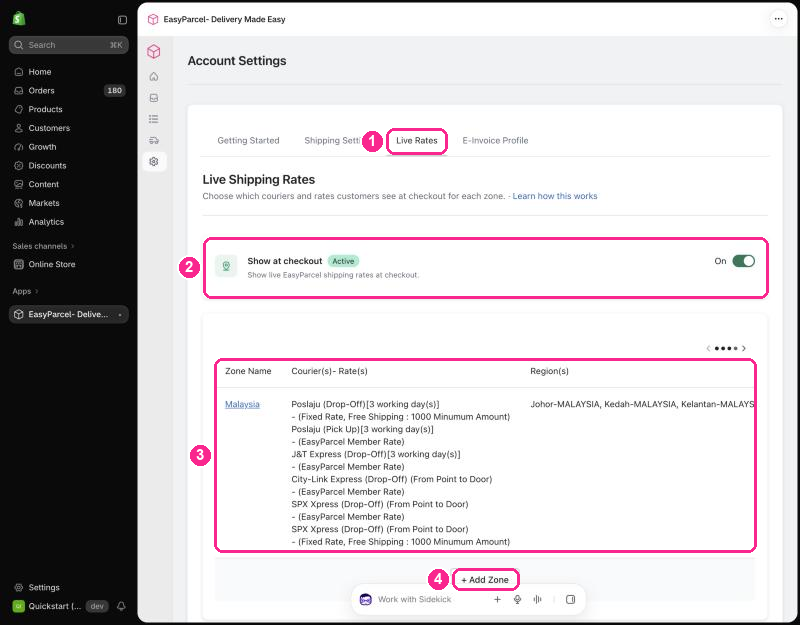
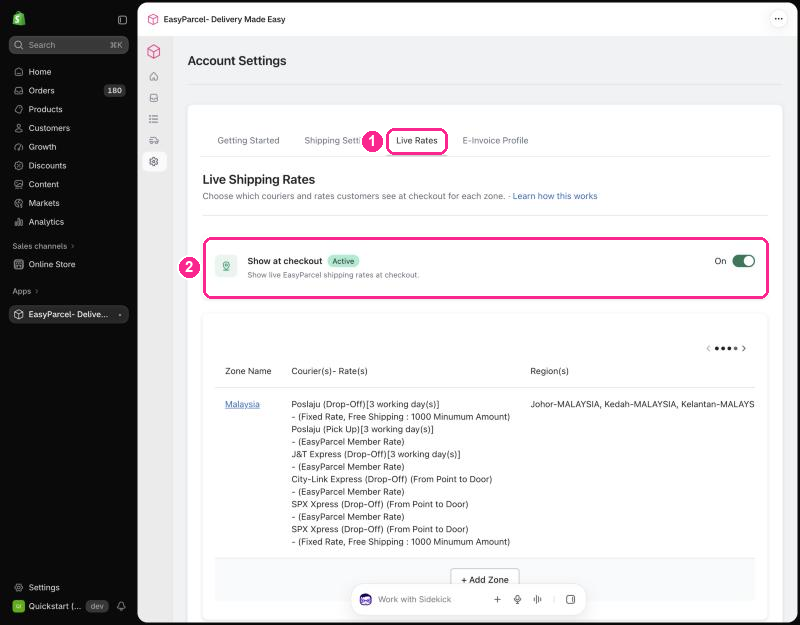
In the app, go to Setting > Live Rates (1) and turn Show at checkout (2) On. It shows Active when it is on. Your zones (3) and + Add Zone (4) are on the same tab.
Check Markets
In Shopify, open Markets and make sure the markets you ship to are Active.
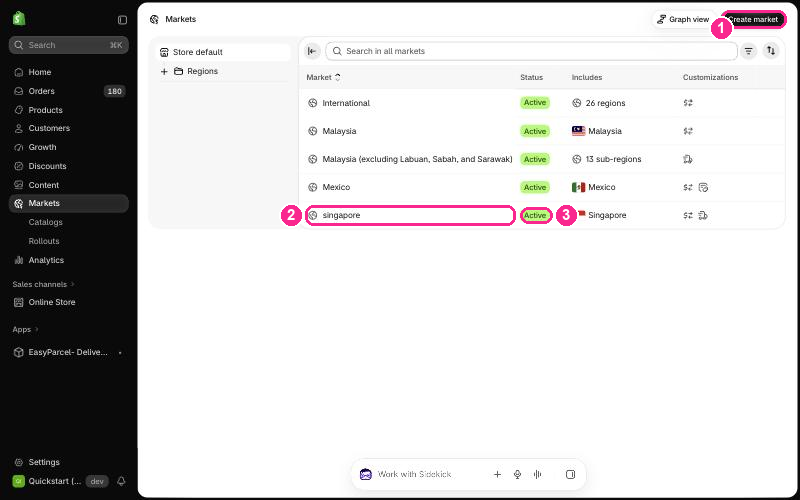
Each market you ship to (2) must show Active (3). Missing one? Click Create market (1).
Add the shipping option
Shopify now manages shipping rates in Markets.
- In Shopify, click Markets and open the market you ship to, for example singapore.
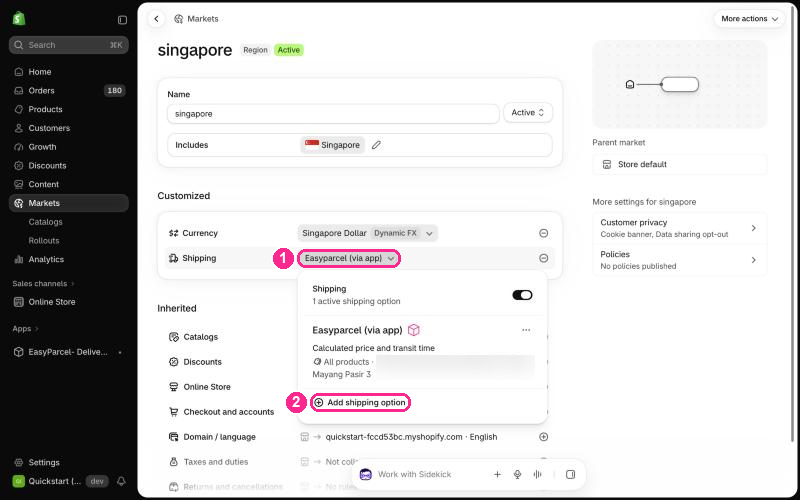
- Next to Shipping (1), open the list and click Add shipping option (2).
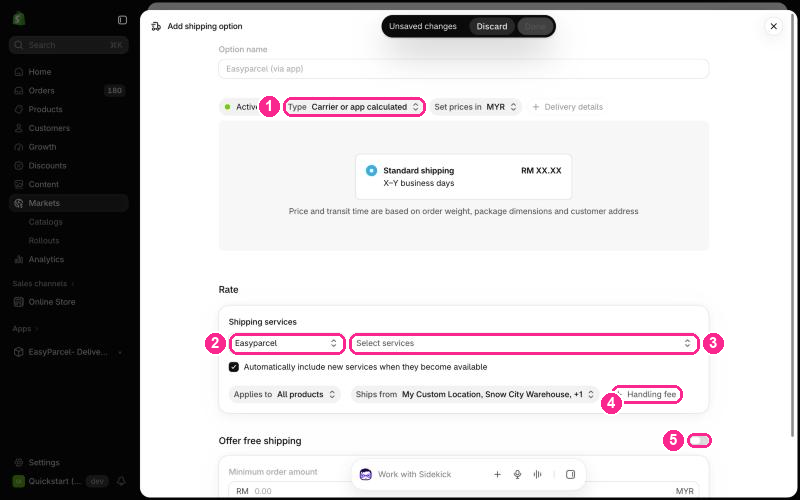
- Set Type to Carrier or app calculated (1).
- Under Shipping services, choose Easyparcel (2) and pick the services in Select services (3).
- You can add a Handling fee (4) or turn on Offer free shipping (5).
- Click Done and save.
Repeat for every market that should show live rates, and keep your Shopify markets in line with your Live Rates zones. Test by adding a product to the cart and going to checkout.
Which Shopify plan do I need for live rates?
Plans
| Shopify plan | Live rates |
| Basic | Not included |
| Grow, annual billing | Included |
| Grow, monthly billing | Add the feature for an extra monthly fee, or switch to annual billing |
| Advanced | Included |
| Plus | Included |
Check your plan in Shopify Settings > Plan (1), under Plan details (2).
How do I activate live rates and check my Markets?
Turn on live rates
- In the app, click Setting.
- Open the Live Rates (1) tab.
- Turn Show at checkout (2) On. It shows Active when it is on.
Check your Markets
- In Shopify admin, click Markets.
- Check the markets you ship to (2) are Active (3).
- Missing one? Click Create market (1).
How do I add EasyParcel as a shipping option in Shopify?
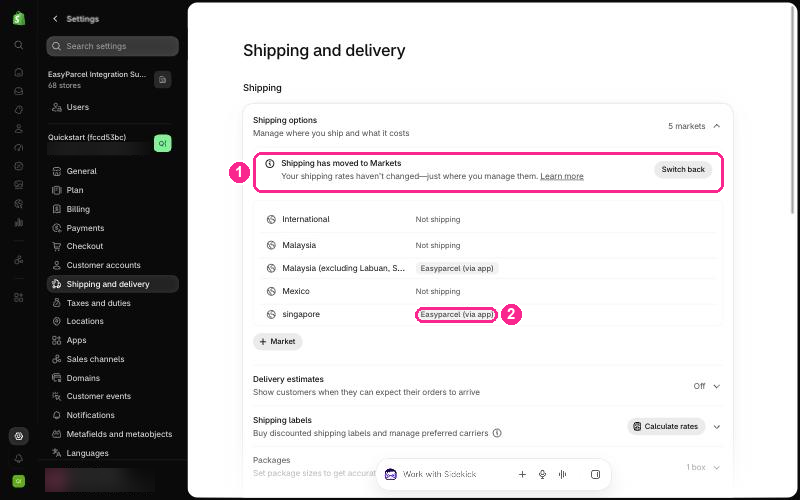
Shopify has moved shipping rates to Markets. In Settings > Shipping and delivery you see Shipping has moved to Markets (1), and each market lists its option, for example Easyparcel (via app) (2).
Steps
- In Shopify, click Markets and open the market you ship to, for example singapore.
- Next to Shipping (1), open the list and click Add shipping option (2).
- Set Type to Carrier or app calculated (1).
- Under Shipping services, choose Easyparcel (2) and pick the services in Select services (3).
- You can add a Handling fee (4) or turn on Offer free shipping (5).
- Click Done and save.
Extra options
- Automatically include new services: new couriers are added for you.
- Handling fee: adds an extra amount on top of the rate.
- Offer free shipping: gives your customers free shipping, for example above a minimum order amount.
Keep your Shopify markets in line with your EasyParcel Live Rates zones. Test by going to checkout with a product in the cart.
What's next?
Still need help?
Our team is happy to help. ? Live Chat | ✉️ Contact Us
