
Quick Summary
Under Setting > Shipping Setting > Sender Details you can add more than one pick-up address and set a default.
We'll Cover:
Buttons
| Button | What it does |
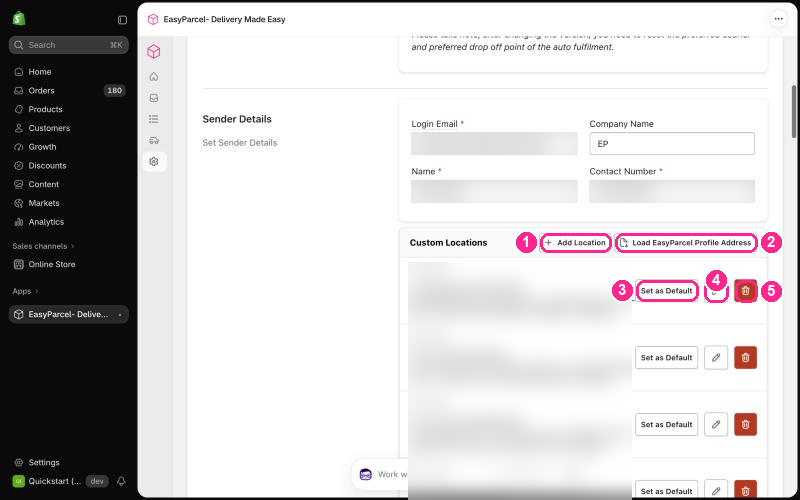
| Add Location | Add a pick-up address manually |
| Load EasyParcel Profile Address | Use the address saved in your EasyParcel account |
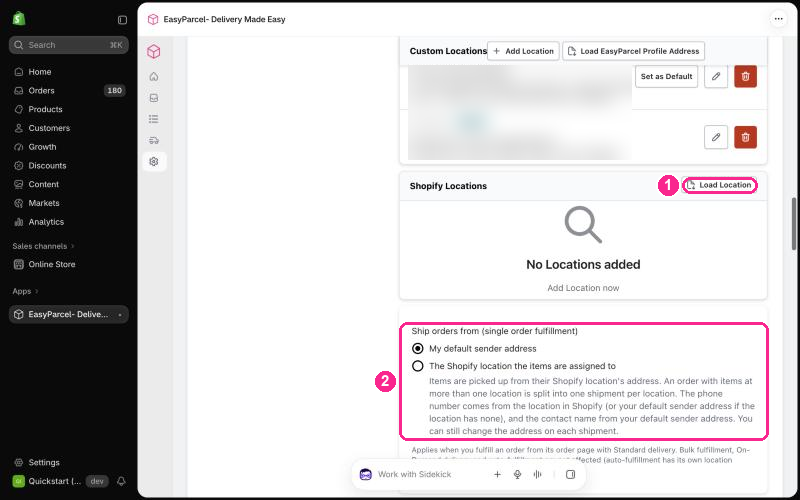
| Load Location | Use the locations set up in Shopify |
| Set as Default | Make it your main shipping-from address |
| Edit / bin icon | Edit or delete an address |
In the app: Add Location (1), Load EasyParcel Profile Address (2), Set as Default (3), edit (4) and delete (5).
For Shopify locations, click Load Location (1). Under Ship orders from (2), choose your default sender address or the Shopify location the items are assigned to. This applies when you fulfil one order with Standard delivery.
To choose whether parcels ship from your default address or from your Shopify locations, see Where do my Shopify parcels ship from?.
Tip
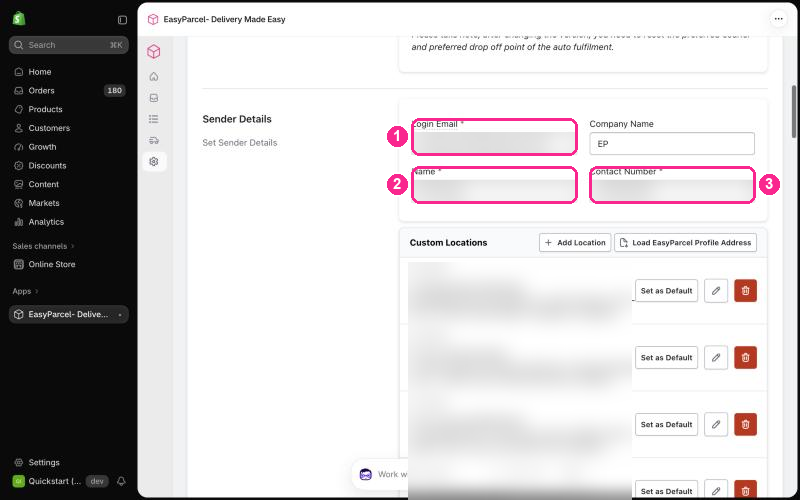
Set your most-used address as default. Fill in your login email, name and a contact number you answer, because couriers may call before pick-up.
Fill in Login Email (1), Name (2) and Contact Number (3).
What's next?
Still need help?
Our team is happy to help. ? Live Chat | ✉️ Contact Us