
Quick Summary
Zones group the places you ship to, each with its own couriers. In Setting > Live Rates, click + Add Zone, add the destinations, then add your couriers.
We'll Cover:
- What a zone is?
- Add a zone
- Add couriers
- How do I create a courier zone in the Shopify app?
- How do I add couriers to a zone in the Shopify app?
What a zone is?
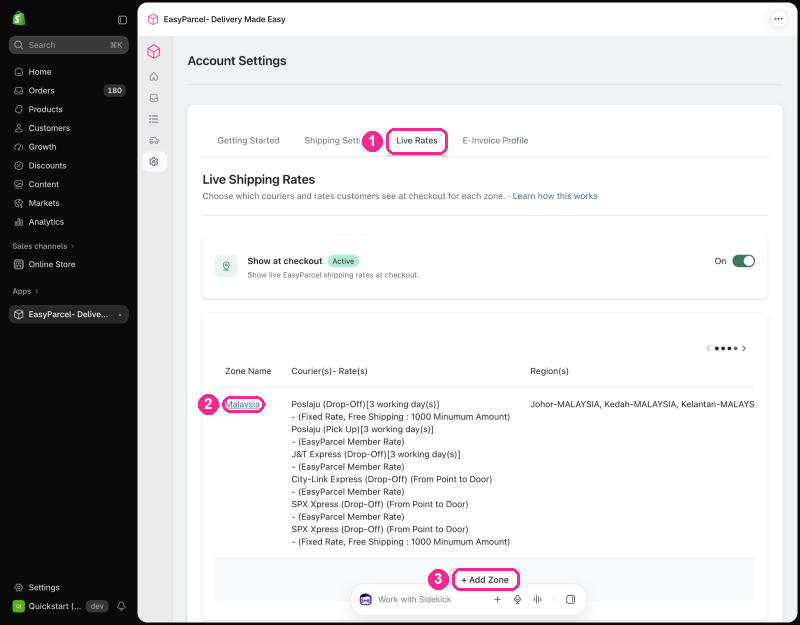
Zones are on the Live Rates (1) tab in Setting. Each zone shows its Zone Name (2), the Courier(s) - Rate(s) and the Region(s). A zone showing No Courier Applied To This Zone has no couriers yet. Click + Add Zone (3) to make a new one.
Add a zone
- On the Live Rates tab, click + Add Zone.
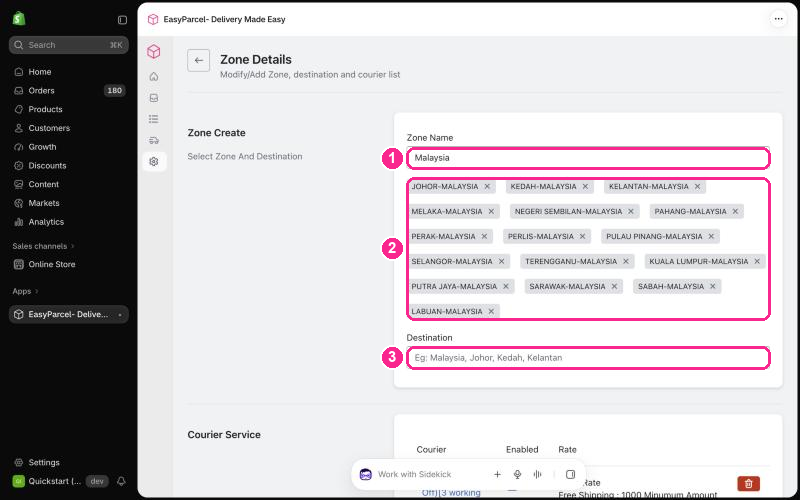
- Enter a Zone Name (1), for example Singapore.
- In Destination (3), type and select the countries or states. They show as tags (2). Click the x on a tag to remove it.
Add couriers
- Scroll to Courier Service.
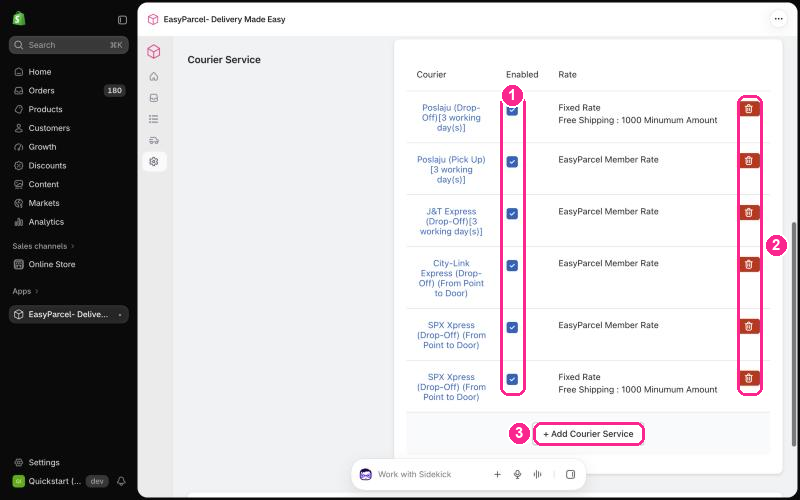
- Click + Add Courier Service (3) and pick your couriers.
- Keep Enabled (1) ticked for each courier you want active.
Untick Enabled to switch a courier off, or click the red bin (2) to remove it. Repeat for each zone, for example an international zone.
How do I create a courier zone in the Shopify app?
Steps
- Open Setting and click the Live Rates (1) tab.
- Click + Add Zone (3).
- Enter a Zone Name, for example Singapore.
- In Destination, type and select the countries or states. Click the x on a tag to remove it.
The zone list
Each zone shows the Zone Name (2), the Courier(s) - Rate(s) and the Region(s). No Courier Applied To This Zone means you still need to add couriers.
How do I add couriers to a zone in the Shopify app?
Steps
- On the Live Rates tab, click the zone name.
- Scroll to Courier Service and click + Add Courier Service (3).
- Pick the couriers for this zone.
- Keep Enabled (1) ticked for each courier you want active.
Tips
Add a few couriers per zone so you or your customers can choose faster, cheaper, or drop-off and pick-up. Untick Enabled to switch one off, or click the red bin (2) to remove it.
What's next?
Still need help?
Our team is happy to help. ? Live Chat | ✉️ Contact Us
