
Quick Summary
In Courier and Drop Off, choose the pick-up date, courier and drop-off point, then check add-ons and coupons.
We'll Cover:
Courier and drop-off
| Field | What to do |
| Pickup Date (optional) | When the courier collects |
| Courier | Pick a courier. The price shows next to it |
| Drop Off | Choose a drop-off point for drop-off services |
Click Get Quote after changing parcel details. If the customer chose a courier at checkout, it is selected for you.
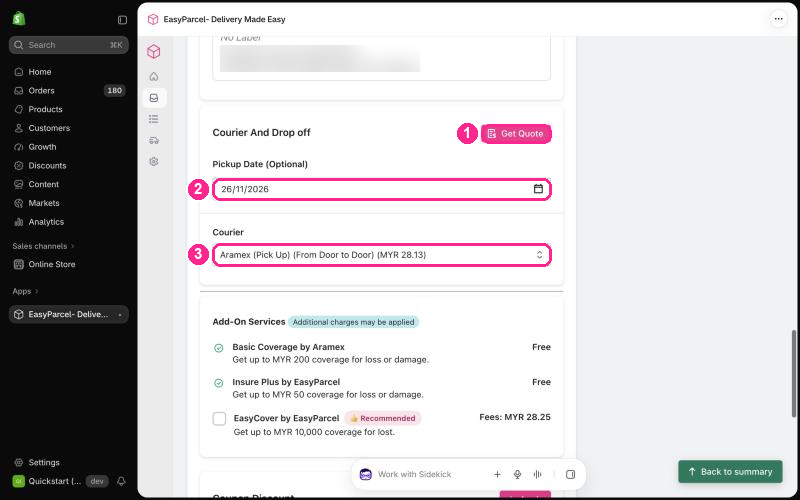
Click Get Quote (1), pick a Pickup Date (2) and choose the Courier (3).
Add-on services
Extra protection such as coverage for loss or damage. Some are free and some have additional charges.
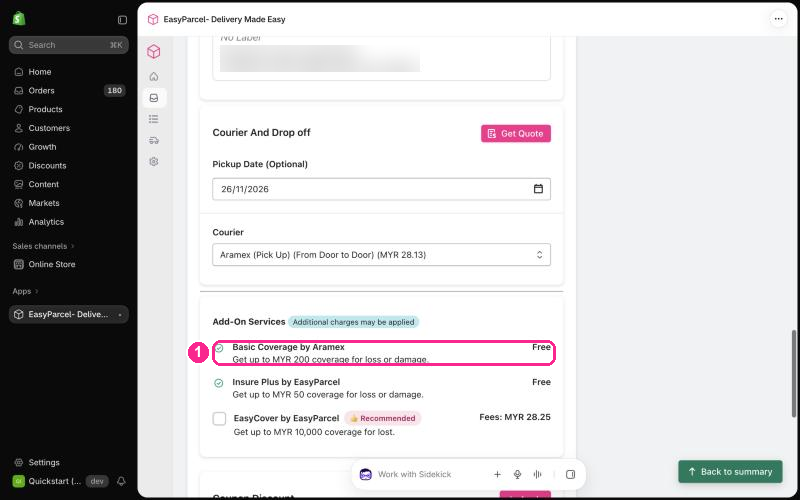
You see the courier's Basic Coverage (1). For international parcels, you may also see options such as Delivered Duty Paid (DDP).
Coupons
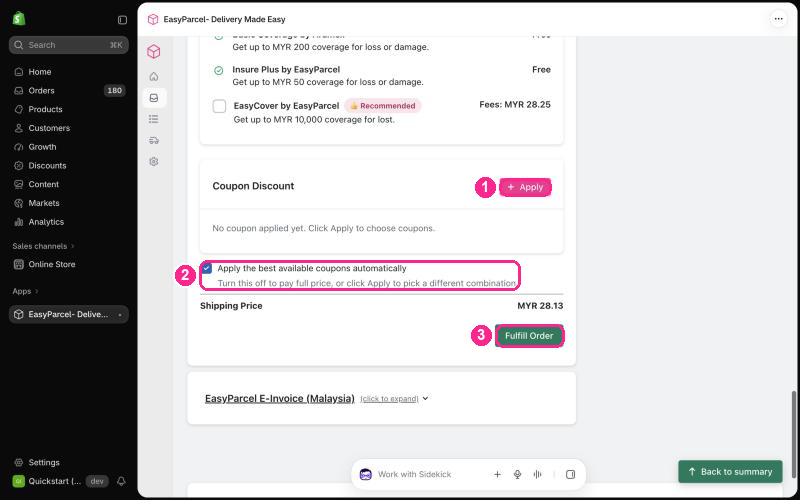
With Apply the best available coupons automatically ticked, the app picks the best coupons. Untick it to pay full price, or click Apply to choose a combination.
Click Apply (1) to choose coupons, or keep Apply the best available coupons automatically (2) ticked. Then click Fulfill Order (3).
What's next?
Still need help?
Our team is happy to help. ? Live Chat | ✉️ Contact Us