
Quick Summary
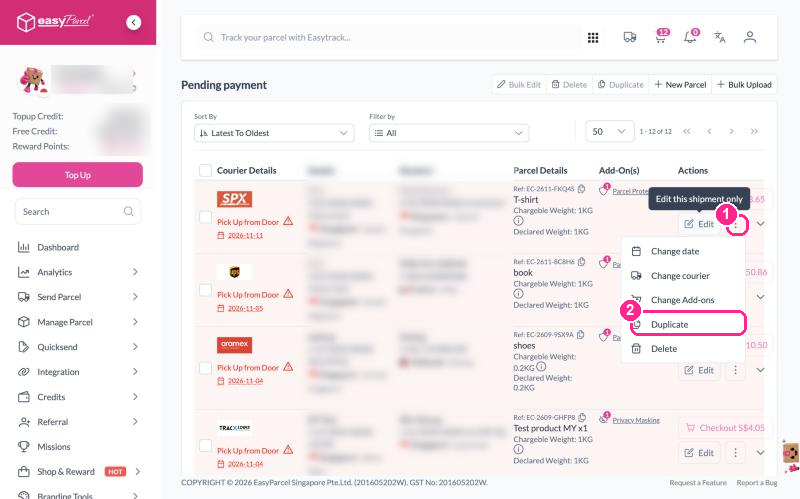
Use Duplicate to make a copy of a parcel that is waiting for payment. It is useful when you send similar parcels again, because you do not need to fill in the form from the start. Open Pending payment, click the more (⋮) icon on the parcel row and choose Duplicate.
We'll Cover:
How to duplicate a parcel?
- Go to Pending payment (click the cart icon at the top).
- Click the ⋮ icon (1) on the parcel row.
- Choose Duplicate (2).
What you will see?
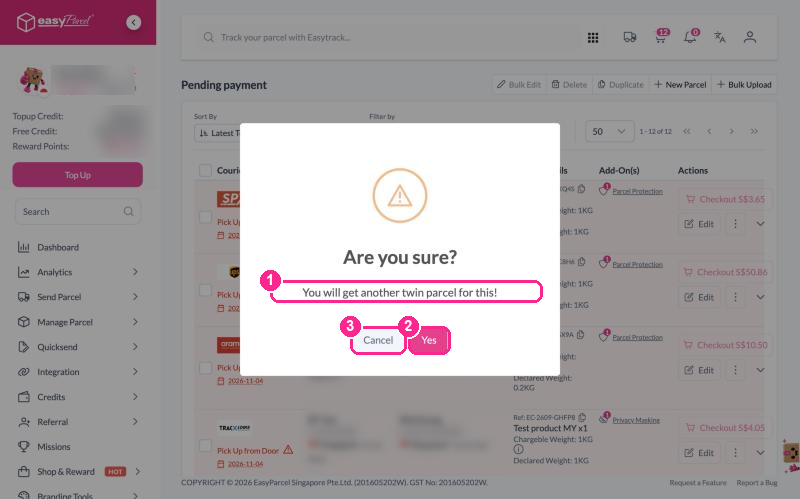
A message asks "Are you sure? You will get another twin parcel for this!" (1). Click Yes (2) to create the copy, or Cancel (3) to stop.
Tip: You can also tick one or more parcels and use Duplicate in the toolbar at the top of the page.
Note: The copy is a separate parcel. Check its details and pay for it like any other parcel.
What's next?
Still need help?
Our team is happy to help. ? Live Chat | ✉️ Contact Us