
Quick Summary
Follow these steps in order to set up the EasyParcel app in your Shopify store and ship your first order.
We'll Cover:
Set up in this order
- Install and connect the app: How do I integrate my Shopify store to EasyParcel?
- Fill in your sender details and settings: How do I set up my sender details and account settings in the Shopify app?
- Make the phone number required at checkout: How do I make the phone number required at Shopify checkout?
- Set up courier zones: How do I set up courier zones in the Shopify app?
- Show live rates at checkout (optional): How do I show live courier rates at Shopify checkout?
- Fulfil your first order: How do I fulfil one Shopify order?
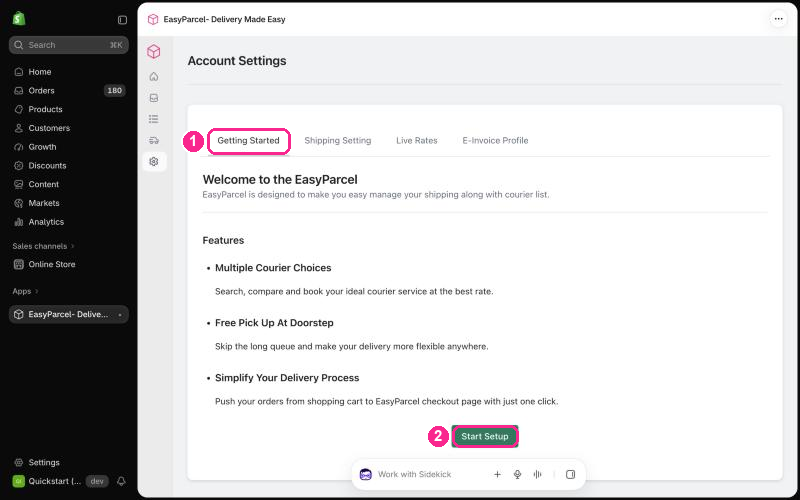
In the app, open Setting. Start on the Getting Started (1) tab and click Start Setup (2).
After you are set up
- Ship many orders at once: How do I fulfil many Shopify orders at once?
- Ship automatically: How do I set up auto fulfilment for Shopify?
- Ship overseas: How do I set up international shipping for Shopify?
- Fix common problems: Shopify app FAQ: common problems and fixes
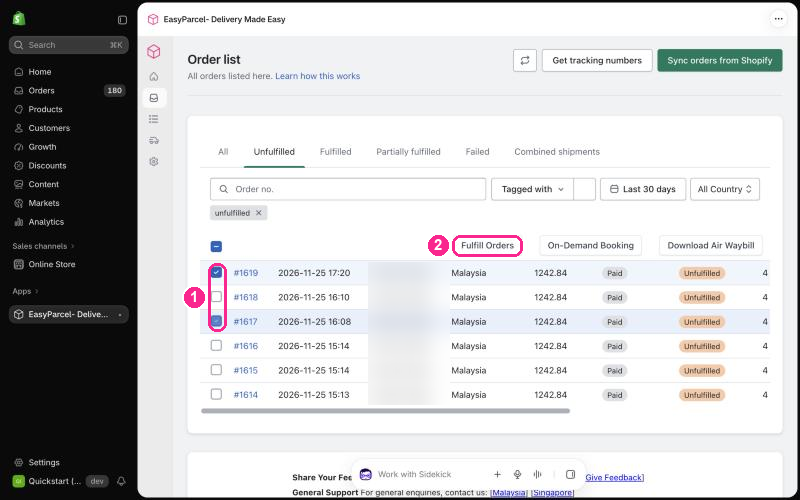
To ship, go to Orders, tick the orders (1) and click Fulfill Orders (2).
What's next?
Still need help?
Our team is happy to help. ? Live Chat | ✉️ Contact Us
