
Quick Summary
To receive an accurate shipping rate, ensure you enter the correct parcel dimensions and weight when booking. Couriers charge based on either the actual weight or the volumetric weight — whichever is higher. Note that different couriers may use different volumetric weight formulas (÷5000 or ÷6000), so your final chargeable weight will be confirmed once you select a courier.
Step 1: Weigh your parcel using a weighing scale to get the actual weight.

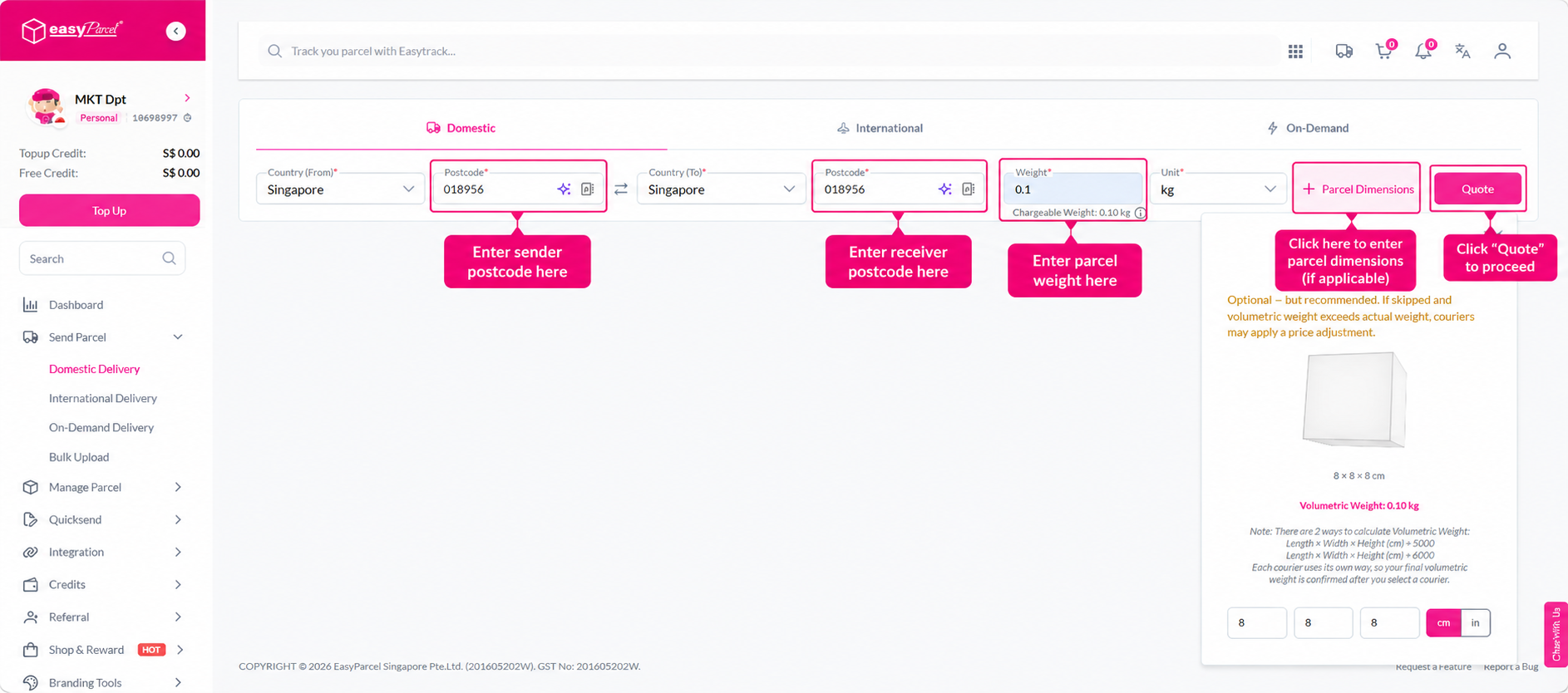
Step 2: Calculate the volumetric weight of your parcel by entering its dimensions (length, width, and height) into EasyParcel's volumetric weight calculator. The calculated result will be displayed automatically.


There are two formulas used to calculate volumetric weight, depending on the courier:
- Length × Width × Height (cm) ÷ 5000
- Length × Width × Height (cm) ÷ 6000
Each courier uses its own formula, and your final volumetric weight will be confirmed after you select a courier during booking.
Step 3: Compare the actual weight against the volumetric weight. When booking your parcel, enter the higher of the two values as the parcel weight to ensure you receive an accurate shipping rate.

Note: Entering the correct parcel weight helps ensure a smooth delivery experience and avoids unexpected weight surcharges after your parcel has been collected.